Free Shipping on Domestic Orders $75+

One Education Infinity:One Dock Contact Assembly Replacement

Views: 738

View statistics:

Past 24 Hours:
5
Past 7 Days:
20
Past 30 Days:
82
All Time:
738
Comments: 0

No one has left comments on this guide. Will you be first?

Go to guide comments
Completed: 0

No one has marked this guide "completed." Will you be the first?

Favorites: 0

No one has favorited (and subscribed to) this guide. Will you be the first?

Time Required: 7 - 20 minutes
Difficulty: Moderate
One Education Infinity:One Dock Contact Assembly Replacement

Introduction

Go to step 1 ↓

This guide will detail how to replace the circuit board that connects the tablet top with the keyboard base. If the base fails to connect to the tablet replacing this circuit board might solve the problem.

What you need

Tools

    1. One Education Infinity:One Dock Contact Assembly Replacement, Battery: step 1, image 1 of 2 One Education Infinity:One Dock Contact Assembly Replacement, Battery: step 1, image 2 of 2
      • Use a spudger to disconnect the black bundled cable connector from the motherboard.

      Ask FixBot

      Add Comment

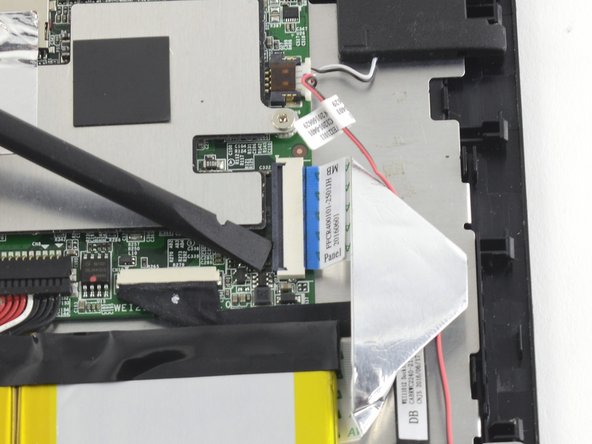
    2. One Education Infinity:One Dock Contact Assembly Replacement: step 2, image 1 of 3 One Education Infinity:One Dock Contact Assembly Replacement: step 2, image 2 of 3 One Education Infinity:One Dock Contact Assembly Replacement: step 2, image 3 of 3
      • Use a spudger to lift the black tab on top of the ZIF connector.

      • Slide the ribbon cable out of the connector.

      Ask FixBot

      Add Comment

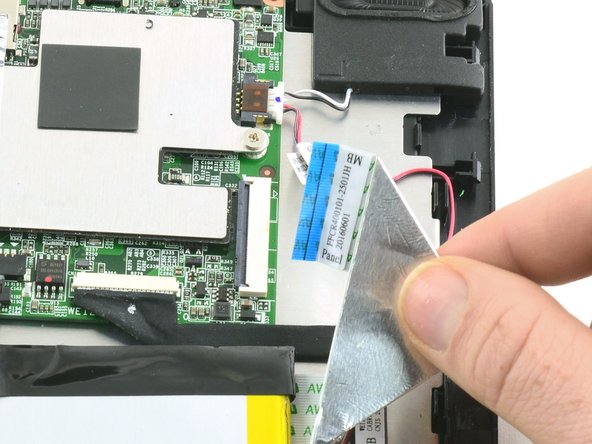
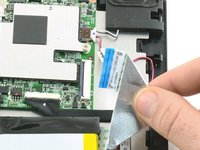
    3. One Education Infinity:One Dock Contact Assembly Replacement: step 3, image 1 of 3 One Education Infinity:One Dock Contact Assembly Replacement: step 3, image 2 of 3 One Education Infinity:One Dock Contact Assembly Replacement: step 3, image 3 of 3
      • Use a spudger to flip up the black retaining flap on the ZIF connector.

      • Pull the folded ribbon cable straight out of the connector.

      • This ribbon cable must be disconnected before removing the battery because it is attached to the battery with adhesive.

      Ask FixBot

      Add Comment

    4. One Education Infinity:One Dock Contact Assembly Replacement: step 4, image 1 of 1
      • Use a spudger to pry the battery away from the device.

      • Always use ESD safe tools when working with delicate electrical components.

      Ask FixBot

      Add Comment

    1. One Education Infinity:One Dock Contact Assembly Replacement, Dock Contact Assembly: step 5, image 1 of 1
      Tool used on this step:
      Tweezers
      $4.99
      Buy
      • Use tweezers to pull the dock contact display cable away from the connector on the motherboard.

      Ask FixBot

      Add Comment

    2. One Education Infinity:One Dock Contact Assembly Replacement: step 6, image 1 of 1
      • Use a Phillips #000 screwdriver to unscrew the two 4.2mm screws from the circuit board containing the dock contact.

      Ask FixBot

      Add Comment

    3. One Education Infinity:One Dock Contact Assembly Replacement: step 7, image 1 of 1
      • Lift the dock contact assembly away from the device.

      Ask FixBot

      Add Comment

Conclusion

To reassemble your device, follow these instructions in reverse order.

Cancel: I did not complete this guide.

Taylor Bratsch

Member since: 09/06/16

6,186 Reputation

14 Guides authored

0 Guide Comments

Add Comment

View Statistics:

Past 24 Hours: 5

Past 7 Days: 20

Past 30 Days: 82

All Time: 738