Free Shipping on Domestic Orders $75+

One Education Infinity:One Antenna Prerequisite

Prerequisite Only
This is a prerequisite-only guide! This guide is part of another procedure and isn’t meant to be used alone.

What you need

    1. One Education Infinity:One Antenna Prerequisite, Battery: step 1, image 1 of 2 One Education Infinity:One Antenna Prerequisite, Battery: step 1, image 2 of 2
      • Use a spudger to disconnect the black bundled cable connector from the motherboard.

      Ask FixBot

      Add Comment

    2. One Education Infinity:One Antenna Prerequisite: step 2, image 1 of 3 One Education Infinity:One Antenna Prerequisite: step 2, image 2 of 3 One Education Infinity:One Antenna Prerequisite: step 2, image 3 of 3
      • Use a spudger to lift the black tab on top of the ZIF connector.

      • Slide the ribbon cable out of the connector.

      Ask FixBot

      Add Comment

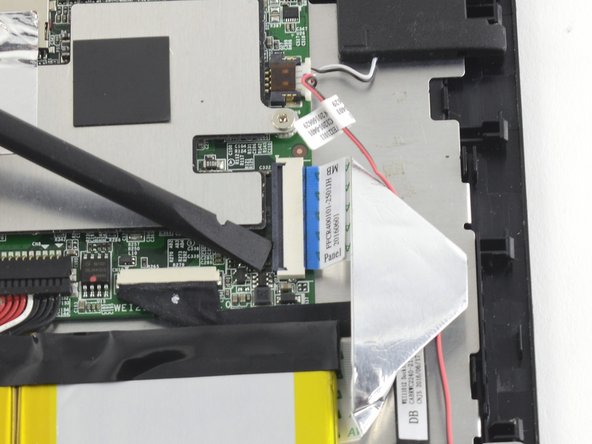
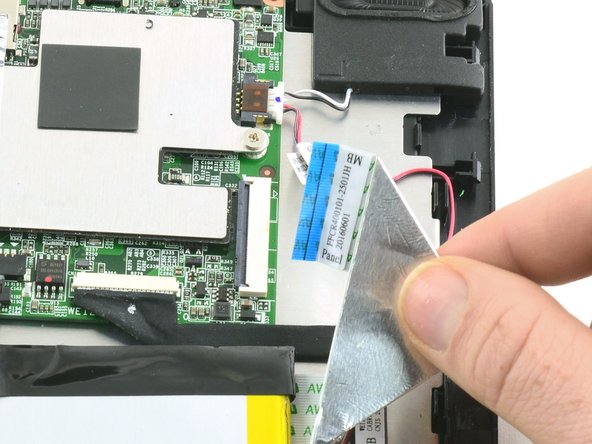
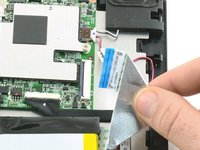
    3. One Education Infinity:One Antenna Prerequisite: step 3, image 1 of 3 One Education Infinity:One Antenna Prerequisite: step 3, image 2 of 3 One Education Infinity:One Antenna Prerequisite: step 3, image 3 of 3
      • Use a spudger to flip up the black retaining flap on the ZIF connector.

      • Pull the folded ribbon cable straight out of the connector.

      • This ribbon cable must be disconnected before removing the battery because it is attached to the battery with adhesive.

      Ask FixBot

      Add Comment

    4. One Education Infinity:One Antenna Prerequisite: step 4, image 1 of 1
      • Use a spudger to pry the battery away from the device.

      • Always use ESD safe tools when working with delicate electrical components.

      Ask FixBot

      Add Comment

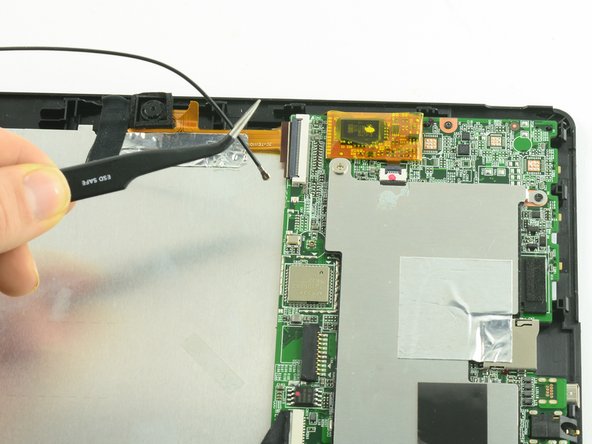
    1. One Education Infinity:One Antenna Prerequisite, Antenna: step 5, image 1 of 2 One Education Infinity:One Antenna Prerequisite, Antenna: step 5, image 2 of 2
      Tool used on this step:
      Tweezers
      $4.99
      Buy
      • Use ESD safe tweezers to disconnect the antenna from the motherboard.

      Ask FixBot

      Add Comment

Conclusion

To reassemble your device, follow these instructions in reverse order.

Cancel: I did not complete this guide.

Taylor Bratsch

Member since: 09/06/16

6,186 Reputation

14 Guides authored

0 Guide Comments

Add Comment

View Statistics:

Past 24 Hours: 1

Past 7 Days: 4

Past 30 Days: 12

All Time: 339