Free Shipping on Domestic Orders $75+

Olympus OM-D E-M10 Mark II HDMI and Multi-connector Cover Replacement

What you need

  1. Olympus OM-D E-M10 Mark II HDMI and Multi-connector Cover Replacement, HDMI and Multi-connector Cover: step 1, image 1 of 1
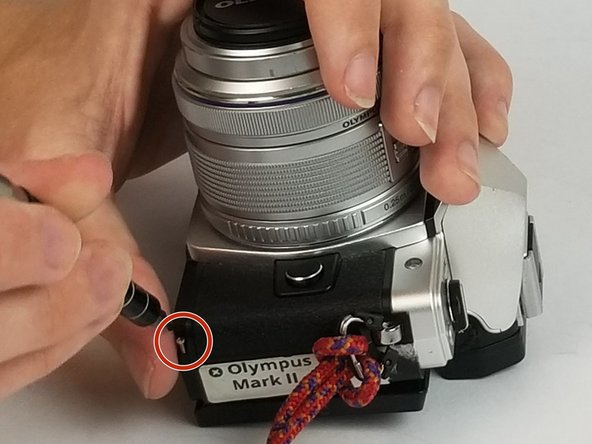
    • There are three different types and lengths of screws used to hold the bottom plate of the camera. Make proper note of each screws original position during your disassembly.

    • Using the PH00 Phillips-head screwdriver, unscrew the two 1/3 inch screws with silver threads from the the bottom of the camera.

    • Using the PH00 Phillips-head screwdriver, unscrew the three 1/3 inch screws with blue threads from the the bottom of the camera.

    • Using the PH00 Phillips-head screwdriver, unscrew the three 1/2 inch screws with silver threads from the the bottom of the camera.

    Ask FixBot

    Add Comment

  2. Olympus OM-D E-M10 Mark II HDMI and Multi-connector Cover Replacement: step 2, image 1 of 1
    • After removing all of the screws, remove the bottom plate from the camera to continue.

    Ask FixBot

    Add Comment

  3. Olympus OM-D E-M10 Mark II HDMI and Multi-connector Cover Replacement: step 3, image 1 of 2 Olympus OM-D E-M10 Mark II HDMI and Multi-connector Cover Replacement: step 3, image 2 of 2
    • Continuing to use the size PH00 Phillips-head screwdriver, remove the two 3/5 inch screws revealed after removing the bottom plate of the camera.

    Ask FixBot

    Add Comment

  4. Olympus OM-D E-M10 Mark II HDMI and Multi-connector Cover Replacement: step 4, image 1 of 1
    • Open the HDMI connector door and continue to use the PH00 Phillips-head screwdriver to remove the 3/10 inch screw located underneath the door.

    Ask FixBot

    Add Comment

  5. Olympus OM-D E-M10 Mark II HDMI and Multi-connector Cover Replacement: step 5, image 1 of 1
    • Proper removal of all 11 screws listed in the steps above from the camera gives the camera the ability to be opened slightly and allows for the door to be lifted off of the hooks holding it in place within the camera.

    Ask FixBot

    Add Comment

Conclusion

To add your new HDMI connector door, follow these instructions in reverse order.

Cancel: I did not complete this guide.

One other person completed this guide.

Allen Anjal

Member since: 09/27/16

341 Reputation

2 Guides authored

Team

USF Tampa, Team S5-G6, Eyestone Spring 2018 Member of USF Tampa, Team S5-G6, Eyestone Spring 2018

USFT-EYESTONE-S18S5G6

4 Members

15 Guides authored

2 Guide Comments

so, where can I buy the port cover or door for the OMD-em10 mark2? Thanks

Raffy Martinez - Reply Share

Hello, thank you for this tutorial. Can you provide a link to purchase this part please?

guy-noel hoareau - Reply Share

Add Comment

View Statistics:

Past 24 Hours: 0

Past 7 Days: 13

Past 30 Days: 89

All Time: 4,727