
Olympus C-765 Motherboard Replacement

Mason Morgan and
Last updated on May 7, 2024
Views: 4.2K
View statistics:
- Past 24 Hours:
- 5
- Past 7 Days:
- 26
- Past 30 Days:
- 89
- All Time:
- 4,223
Comments: 0
No one has left comments on this guide. Will you be first?
Go to guide commentsCompleted: 0 1
No one has marked this guide "completed." Will you be the first?
1 person has marked this guide "completed." It's you — great job!
Favorites: 0 1
No one has favorited (and subscribed to) this guide. Will you be the first?
1 person has favorited (and subscribed to) this guide — and that's you!
Missing Details
Some of this guide's details are missing. Help users by adding tools, difficulty, or time.
Introduction
Go to step 1 ↓Use this guide to replace a malfunctioning motherboard in the Olympus C-765.
The motherboard is a large, printed circuit board that controls all of the camera’s functions. A malfunctioning motherboard may be responsible for overall defunct camera operations. When a motherboard is bad, a camera may display a variety of errors, may function slowly, or may fail to start up at all. If the board is malfunctioning, it must be replaced in order to restore the camera to working order.
Be sure to consult the Troubleshooting guide before attempting to replace the motherboard. A slow camera may simply be solved by a system reset. A replacement only needs to be attempted if the reset does not work.
This guide will demonstrate how to complete this replacement process. The process involves multiple steps, including difficult steps like soldering.
What you need
Tools


-
-
-
Use a Phillips #00 screwdriver to remove the single 4mm screw located directly to the right of the viewfinder on the back of the camera.
-
Remove the two 2mm screws from the left side panel.
-
Remove the single 3mm screw from the right side panel.
-
Remove the five 3mm screws from the bottom of the camera.
 Ask FixBot
-
-
Tool used on this step:Tweezers$4.99
-
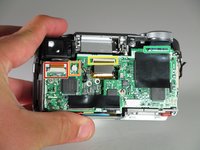
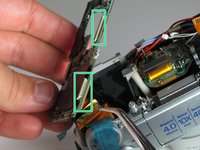
Rock the two ribbon cables gently out of their sockets.
-
Grasp and pull the white cable out of its clip with metal tweezers.
-
Remove the back panel completely.
-
-
-
Peel off the black plastic sheets.
-
Use the Phillips #00 screwdriver to remove the two 3mm screws holding the motherboard in place.
-
-
-
-
Remove the ribbon cable directly below the viewfinder.
-
Detach the white plastic clip from its socket with a pair of tweezers.
-
Disconnect the ribbon cable from the center of the board, near the central hole.
-
Disconnect the three ribbon cables from the top right of the motherboard, near the selector wheel. One is on the top of the board, and the other two are on the underside.
-
-
-
Remove the single 3mm ground screw attached to the right side of the camera body using the Phillips #00 screwdriver.
-
-




To reassemble your device, follow these instructions in reverse order.

Team

Cal Poly, Team 12-33, Maness Spring 2011 Member of Cal Poly, Team 12-33, Maness Spring 2011
CPSU-MANESS-S11S12G33
3 Members
72 Guides authored
