
Nvidia Shield Pro Android TV Bottom Cover Replacement

Christian De Vera and one other contributor
Last updated on Jun 17, 2020
Views: 3.7K
View statistics:
- Past 24 Hours:
- 7
- Past 7 Days:
- 22
- Past 30 Days:
- 125
- All Time:
- 3,723
Comments: 1
1 guide comment.
Go to guide commentsCompleted: 0 1
No one has marked this guide "completed." Will you be the first?
1 person has marked this guide "completed." It's you — great job!
Favorites: 0 1
No one has favorited (and subscribed to) this guide. Will you be the first?
1 person has favorited (and subscribed to) this guide — and that's you!
Introduction
Go to step 1 ↓This guide will show you how to open up your Nvidia Shield Pro Android TV. This is a prerequisite guide needed to replacement components found inside the device.
What you need
Tools

-
-
-
Flip to the back side of your Nvidia Shield Pro Android TV.
-
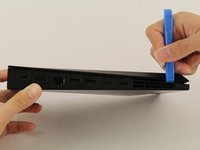
To open the bottom cover of the Nvidia Shield, start from the corner and slide your plastic opening tool across the gap.
-
If using a plastic opening tool to open the bottom cover is difficult, try using a metal spudger.
 Ask FixBot
-
-
-


To reassemble your device, follow these instructions in reverse order.

Team

Cal Poly, Team S18-G2, White Winter 2020 Member of Cal Poly, Team S18-G2, White Winter 2020
CPSU-WHITE-W20S18G2
4 Members
72 Guides authored
