Free Shipping on Domestic Orders $75+

Nokia N70 Display Replacement

What you need

    1. Nokia N70 Display Replacement, Battery: step 1, image 1 of 1
      • Orient the phone as shown.

      • Press the button with the plastic opening tool and slide the back case downward relative to the phone.

      Ask FixBot

      Add Comment

    2. Nokia N70 Display Replacement: step 2, image 1 of 1
      • Remove the battery cover by lifting it away from the phone.

      Ask FixBot

      Add Comment

    3. Nokia N70 Display Replacement: step 3, image 1 of 1
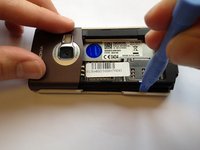
      • Insert the plastic opening tool into the marked space.

      • Lift up the side of the battery closest to the bottom edge of the phone using the plastic opening tool.

      Ask FixBot

      Add Comment

    4. Nokia N70 Display Replacement: step 4, image 1 of 1
      • Remove the battery from the phone.

      Ask FixBot

      Add Comment

    1. Nokia N70 Display Replacement, Keypad: step 5, image 1 of 3 Nokia N70 Display Replacement, Keypad: step 5, image 2 of 3 Nokia N70 Display Replacement, Keypad: step 5, image 3 of 3
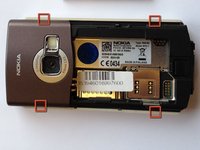
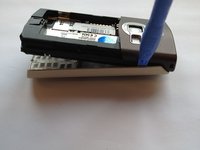
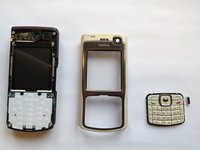
      • Insert the plastic opening tool in the marked areas in between the front and back covers.

      • Pry each corner with the plastic opening tool until the front case completely detaches.

      Ask FixBot

      Add Comment

    2. Nokia N70 Display Replacement: step 6, image 1 of 3 Nokia N70 Display Replacement: step 6, image 2 of 3 Nokia N70 Display Replacement: step 6, image 3 of 3
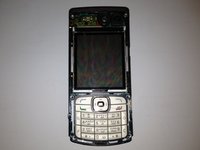
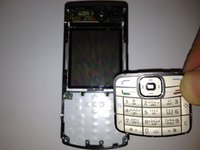
      • Orient the phone so that the keypad is facing you.

      • Remove the keypad by lifting it away from the phone.

      Ask FixBot

      Add Comment

    1. Nokia N70 Display Replacement, Display: step 7, image 1 of 1
      • Using a torx T6 screwdriver remove the six 15 mm torx screws.

      Ask FixBot

      Add Comment

    2. Nokia N70 Display Replacement: step 8, image 1 of 2 Nokia N70 Display Replacement: step 8, image 2 of 2
      • Separate the front panel of the phone by pulling the bottom of the panel at a 45 degree angle.

      Ask FixBot

      Add Comment

    3. Nokia N70 Display Replacement: step 9, image 1 of 2 Nokia N70 Display Replacement: step 9, image 2 of 2
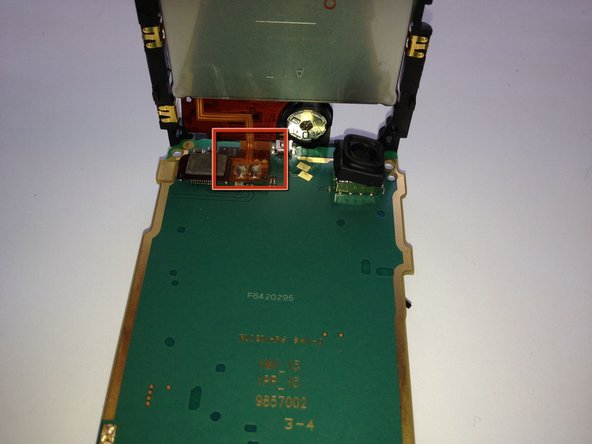
      • Lift the bottom of the display circuit board up and locate the ribbon connection located where the two circuit boards intersect.

      • Remove the ribbon connection that connects the two circuit boards.

      Ask FixBot

      Add Comment

    4. Nokia N70 Display Replacement: step 10, image 1 of 3 Nokia N70 Display Replacement: step 10, image 2 of 3 Nokia N70 Display Replacement: step 10, image 3 of 3
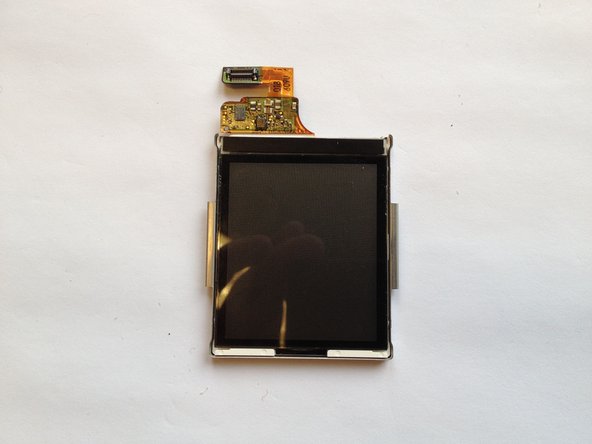
      • While pulling back each of the clamps marked in the image, lift out each side of the screen independently.

      • Be careful when using the plastic prying tool to not scratch the display.

      Ask FixBot

      Add Comment

Conclusion

To reassemble your device, follow these instructions in reverse order.

Cancel: I did not complete this guide.

8 other people completed this guide.

Justin

Member since: 10/12/11

1,026 Reputation

5 Guides authored

Team

Cal Poly, Team 6-2, Regan Fall 2011 Member of Cal Poly, Team 6-2, Regan Fall 2011

CPSU-REGAN-F11S6G2

4 Members

60 Guides authored

0 Guide Comments

Add Comment

View Statistics:

Past 24 Hours: 1

Past 7 Days: 15

Past 30 Days: 63

All Time: 9,634