Free Shipping on Domestic Orders $75+

Nokia Lumia 900 Speaker Replacement

Views: 488

View statistics:

Past 24 Hours:
0
Past 7 Days:
11
Past 30 Days:
50
All Time:
488
Comments: 1

1 comment on steps.

Completed: 0

No one has marked this guide "completed." Will you be the first?

Favorites: 0

No one has favorited (and subscribed to) this guide. Will you be the first?

Time Required: 10 - 20 minutes
Difficulty: Moderate
Nokia Lumia 900 Speaker Replacement

Introduction

Go to step 1 ↓

The speaker is an important component of the Nokia Lumia 900. Because it is a small component that is housed beneath many different parts, this guide will show how to remove it carefully and properly.

What you need

Tools

    1. Nokia Lumia 900 Speaker Replacement, Screen: step 1, image 1 of 2 Nokia Lumia 900 Speaker Replacement, Screen: step 1, image 2 of 2
      • Insert the pointed end of the spudger into the sim card port indicated by the picture. Then proceed to remove the sim card port entirely.

      Ask FixBot

      Add Comment

    2. Nokia Lumia 900 Speaker Replacement: step 2, image 1 of 2 Nokia Lumia 900 Speaker Replacement: step 2, image 2 of 2
      Tool used on this step:
      Tweezers
      $4.99
      Buy
      • Use tweezers to remove the small rod in the port indicated in the picture.

      Ask FixBot

      Add Comment

    3. Nokia Lumia 900 Speaker Replacement: step 3, image 1 of 2 Nokia Lumia 900 Speaker Replacement: step 3, image 2 of 2
      • Separate the screen from the motherboard by prying it open with the spudger along with pulling upwards with the suction cup.

      Ask FixBot

      Add Comment

    4. Nokia Lumia 900 Speaker Replacement: step 4, image 1 of 2 Nokia Lumia 900 Speaker Replacement: step 4, image 2 of 2
      • Gently pull apart the screen from the motherboard, with only the ribbons connected from the motherboard to the screen.

      Ask FixBot

      Add Comment

    5. Nokia Lumia 900 Speaker Replacement: step 5, image 1 of 1
      • Disconnect the No-fuss cables from the motherboard by gently prying them up using the flat end of the black stick spudger. Make sure not to bend or crease the cable.

      • Remove the screen.

      Ask FixBot

      Add Comment

    1. Nokia Lumia 900 Speaker Replacement, Front Camera: step 6, image 1 of 2 Nokia Lumia 900 Speaker Replacement, Front Camera: step 6, image 2 of 2
      • Use the iFixit iOpener or another heat source to gently heat the top left corner until the adhesive under the camera softens.

      • Use the plastic opening tools to carefully lift the front camera from the motherboard.

      Ask FixBot

      Add Comment

    1. Nokia Lumia 900 Speaker Replacement, Battery: step 7, image 1 of 2 Nokia Lumia 900 Speaker Replacement, Battery: step 7, image 2 of 2
      • Use the flat end of a spudger to carefully disconnect the ribbon cable.

      • Make sure not to bend or crease the cable.

      Ask FixBot

      Add Comment

    2. Nokia Lumia 900 Speaker Replacement: step 8, image 1 of 2 Nokia Lumia 900 Speaker Replacement: step 8, image 2 of 2
      • Use the flat end of a spudger to remove the battery.

      • The battery may be glued down. This will be evident if the battery is difficult to lift. Use the iFixit iOpener to heat the back of the phone allowing the glue to heat and become more pliable before trying to lift the battery again. This may take several minutes.

      Ask FixBot

      Add Comment

    1. Nokia Lumia 900 Speaker Replacement, Speaker: step 9, image 1 of 2 Nokia Lumia 900 Speaker Replacement, Speaker: step 9, image 2 of 2
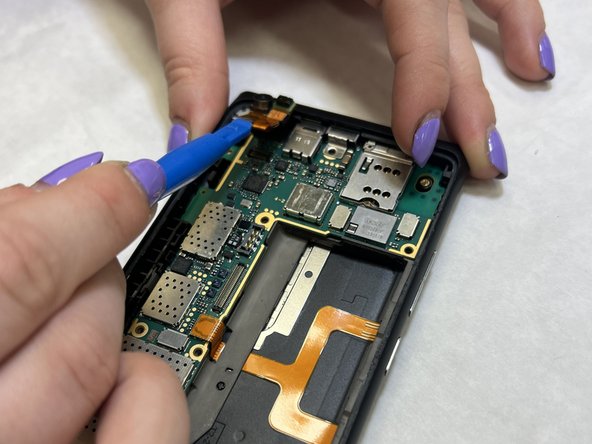
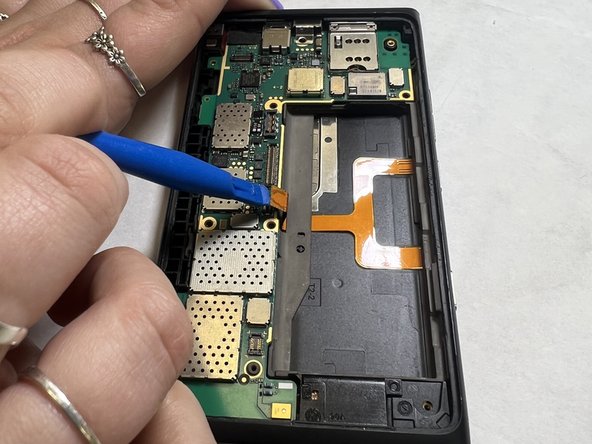
      • Use the plastic opening tool to lift the orange ribbon cable from the motherboard.

      Ask FixBot

      Add Comment

    2. Nokia Lumia 900 Speaker Replacement: step 10, image 1 of 2 Nokia Lumia 900 Speaker Replacement: step 10, image 2 of 2
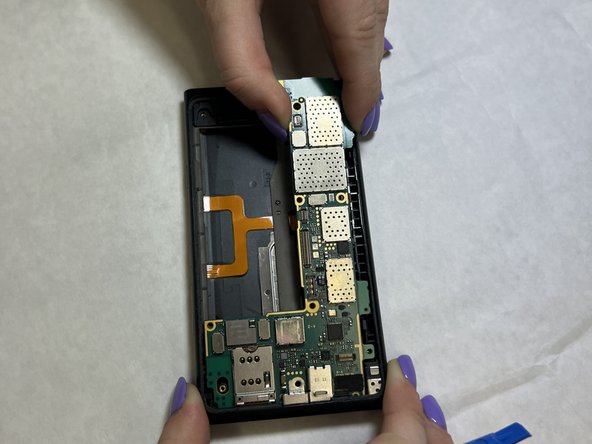
      • Use the plastic opening tool to lift the motherboard out of the casing.

      • It is recommended that you wedge the opening tool in the crevice between the motherboard and casing in the top righthand corner of the device.

      Ask FixBot

      Add Comment

    3. Nokia Lumia 900 Speaker Replacement: step 11, image 1 of 1
      • Use the flat end of a spudger to lift the LED out of the casing.

      Ask FixBot

      Add Comment

    4. Nokia Lumia 900 Speaker Replacement: step 12, image 1 of 2 Nokia Lumia 900 Speaker Replacement: step 12, image 2 of 2
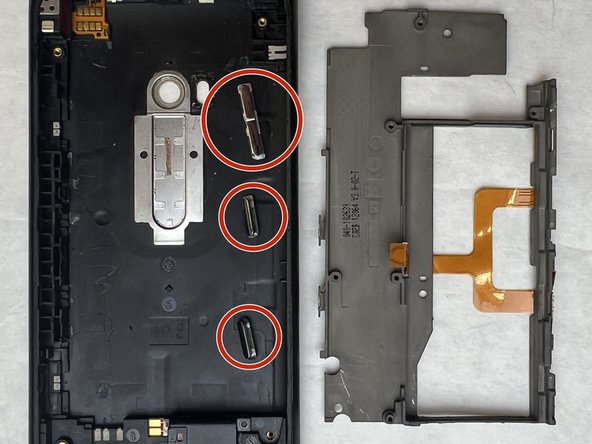
      • Use the flat end of a spudger to lift the metal backplate from the casing.

      • Be sure not to lose the buttons.

      Ask FixBot

      Add Comment

    5. Nokia Lumia 900 Speaker Replacement: step 13, image 1 of 2 Nokia Lumia 900 Speaker Replacement: step 13, image 2 of 2
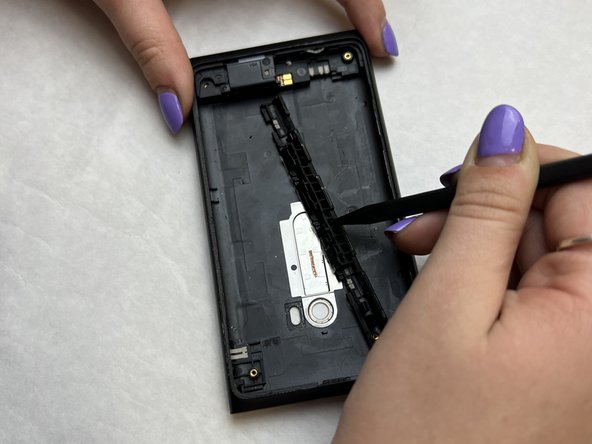
      • Wedge the pointed end of the spudger into the gaps in the antenna housing and pull the antenna housing away from the casing walls.

      Ask FixBot

      Add Comment

    6. Nokia Lumia 900 Speaker Replacement: step 14, image 1 of 2 Nokia Lumia 900 Speaker Replacement: step 14, image 2 of 2
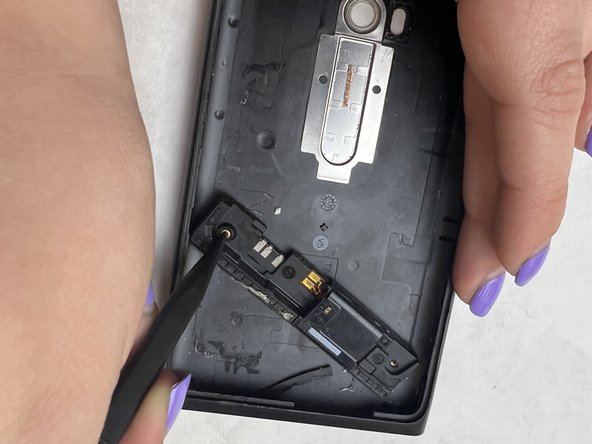
      • Insert the pointed end of the spudger into the hole and slide the speaker housing out from the casing.

      Ask FixBot

      Add Comment

Conclusion

To reassemble your device, follow these instructions in reverse order.

Cancel: I did not complete this guide.

Kourtney Collier

Member since: 03/31/22

289 Reputation

3 Guides authored

Team

IUPUI, Team 3-2, Harley Spring 2022 Member of IUPUI, Team 3-2, Harley Spring 2022

IUPUI-HARLEY-S22S3G2

3 Members

36 Guides authored

0 Guide Comments

Add Comment

View Statistics:

Past 24 Hours: 0

Past 7 Days: 11

Past 30 Days: 50

All Time: 488