Introduction
The screen for your Nokia like the motherboard is essential as it displays all the information in order for you to use it. You may need to replace the screen if it's cracked or just straight up filthy. If your screen is cracked you must be careful and replace it as soon as possible. This is due to internal components could possibly be exposed and damaged. This guide will show you how to replace your screen on a Nokia 2660 Flip and get back using your phone.
Make sure to turn off the device and unplug from any charging source before going through this guide!
What you need
-
-
-
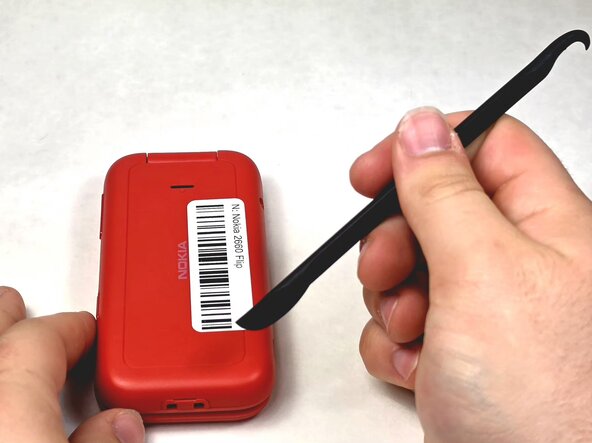
Turn your Nokia around to the rear side.
-
Insert a spudger or your fingernail into the notch on the bottom of the device.
 Ask FixBot
-
-
-
Insert a spudger or fingernail into the slot.
-
Gently remove the battery out of the slot.
-
-
-
-
-
-
Remove the screws using the TR6 Torx screwdriver.
-
Lift up the red casing with a spudger to reveal the motherboard.
-
-
-
With a clean fingernail or spudger, detach the ribbon cable.
-
Use a Jimmy to lift the motherboard up and place it to the side.
-
-
-
-
-
Remove the five 1.2mm screws with a Phillips #0 screwdriver.
-
Use a spudger to remove the casing and set it aside.
-
-
-
Use either tweezers or a spudger to gently disconnect the first ribbon cable.
-
Use tweezers to disconnect the second ribbon cable.
-
Lift up the screen component and set it aside.
-



To reassemble your device, follow these instructions in reverse order.

Team

UMass Dartmouth, Team 1-6, Evans Spring 2026 Member of UMass Dartmouth, Team 1-6, Evans Spring 2026
UMASSD-EVANS-S26S1G6
4 Members
60 Guides authored
