Free Shipping on Domestic Orders $75+

Nokia 2660 Flip Camera Replacement

What you need

  1. Nokia 2660 Flip Camera Replacement, Battery: step 1, image 1 of 3 Nokia 2660 Flip Camera Replacement, Battery: step 1, image 2 of 3 Nokia 2660 Flip Camera Replacement, Battery: step 1, image 3 of 3
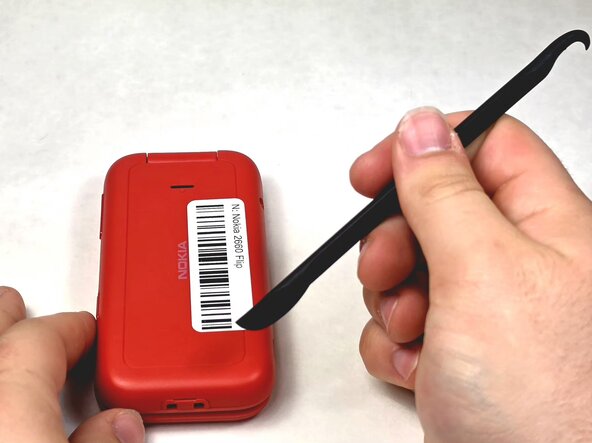
    • Turn your Nokia around to the rear side.

    • Insert a spudger or your fingernail into the notch on the bottom of the device.

    Ask FixBot
  2. Nokia 2660 Flip Camera Replacement: step 2, image 1 of 3 Nokia 2660 Flip Camera Replacement: step 2, image 2 of 3 Nokia 2660 Flip Camera Replacement: step 2, image 3 of 3
    • Pry the rear casing out towards you.

    Ask FixBot
  3. Nokia 2660 Flip Camera Replacement: step 3, image 1 of 3 Nokia 2660 Flip Camera Replacement: step 3, image 2 of 3 Nokia 2660 Flip Camera Replacement: step 3, image 3 of 3
    • Insert a spudger or fingernail into the slot.

    • Gently remove the battery out of the slot.

    • Keep in mind inserting the new battery into the prongs.

    Ask FixBot
  4. Nokia 2660 Flip Camera Replacement, Motherboard: step 4, image 1 of 3 Nokia 2660 Flip Camera Replacement, Motherboard: step 4, image 2 of 3 Nokia 2660 Flip Camera Replacement, Motherboard: step 4, image 3 of 3
    • Remove the screws using the TR6 Torx screwdriver.

    • Lift up the red casing with a spudger to reveal the motherboard.

    Ask FixBot
  5. Nokia 2660 Flip Camera Replacement: step 5, image 1 of 3 Nokia 2660 Flip Camera Replacement: step 5, image 2 of 3 Nokia 2660 Flip Camera Replacement: step 5, image 3 of 3
    • Be very gentle with the motherboard as pulling too harshly can damage the ribbon cable.

    • With a clean fingernail or spudger, detach the ribbon cable.

    • Use a Jimmy to lift the motherboard up and place it to the side.

    • Once the motherboard has been removed check for any damages, if there are any you must safely dispose of the motherboard itself.

    Ask FixBot
  6. Nokia 2660 Flip Camera Replacement, Screen: step 6, image 1 of 3 Nokia 2660 Flip Camera Replacement, Screen: step 6, image 2 of 3 Nokia 2660 Flip Camera Replacement, Screen: step 6, image 3 of 3
    • Using a Jimmy to pry the bezel and screen protector up towards you.

    • The bezel/screen protector can be difficult to remove with the Jimmy, so be sure to slide it underneath the entirety of the component.

    Ask FixBot
  7. Nokia 2660 Flip Camera Replacement: step 7, image 1 of 3 Nokia 2660 Flip Camera Replacement: step 7, image 2 of 3 Nokia 2660 Flip Camera Replacement: step 7, image 3 of 3
    • Remove the five 1.2mm screws with a Phillips #0 screwdriver.

    • Use a spudger to remove the casing and set it aside.

    Ask FixBot
  8. Nokia 2660 Flip Camera Replacement: step 8, image 1 of 3 Nokia 2660 Flip Camera Replacement: step 8, image 2 of 3 Nokia 2660 Flip Camera Replacement: step 8, image 3 of 3
    • Use either tweezers or a spudger to gently disconnect the first ribbon cable.

    • Please be careful when disconnecting the ribbon cables as they are very sensitive.

    • Use tweezers to disconnect the second ribbon cable.

    • Lift up the screen component and set it aside.

    Ask FixBot
  9. Nokia 2660 Flip Camera Replacement, Camera: step 9, image 1 of 3 Nokia 2660 Flip Camera Replacement, Camera: step 9, image 2 of 3 Nokia 2660 Flip Camera Replacement, Camera: step 9, image 3 of 3
    • Use gentle force when disconnecting the ribbon cables.

    • Disconnect the ribbon cable for the camera if you haven't already.

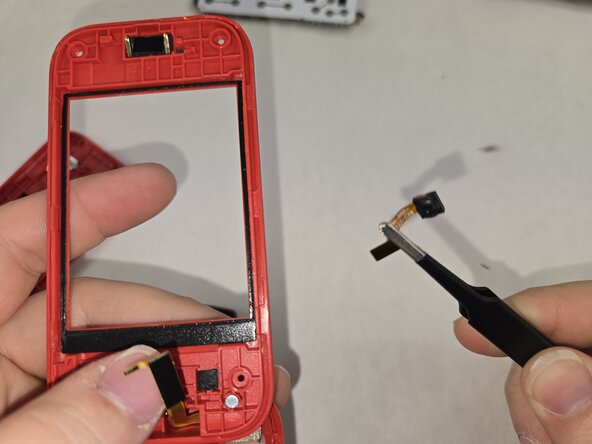
    • Using tweezers remove the camera from its slot.

    Ask FixBot
Conclusion

To reassemble your device, follow these instructions in reverse order.

Kobe Rouke

Member since: 03/05/26

521 Reputation

5 Guides authored

Team

0 Guide Comments

Add Comment

View Statistics:

Past 24 Hours: 2

Past 7 Days: 4

Past 30 Days: 7

All Time: 17