15% Off Selected iFixit Tools — Limited Time
Free Shipping on Domestic Orders $75+

Nintendo Wii Remote Shell Replacement

What you need

  1. Nintendo Wii Remote Shell Replacement, Removing the strap (Optional, but recommended.): step 1, image 1 of 1
    • Remove the Safety strap to prevent it into getting in our way

    Ask FixBot

    Add Comment

  2. Nintendo Wii Remote Shell Replacement, Removing the batteries: step 2, image 1 of 2 Nintendo Wii Remote Shell Replacement, Removing the batteries: step 2, image 2 of 2
    • Remove the battery using a fingernail.

    Ask FixBot

    Add Comment

  3. Nintendo Wii Remote Shell Replacement, Removing the screws: step 3, image 1 of 2 Nintendo Wii Remote Shell Replacement, Removing the screws: step 3, image 2 of 2
    • This is where the disassembly begins, Grab your Y1 Screwdriver and unscrew the following screws

    Ask FixBot

    Add Comment

    • Gently take out the front cover

    Ask FixBot

    Add Comment

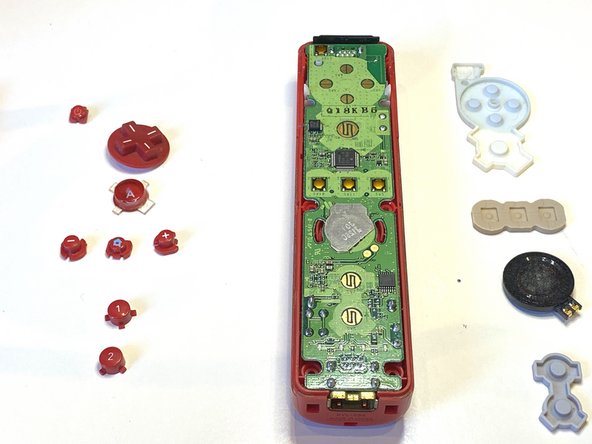
  4. Nintendo Wii Remote Shell Replacement, Removing the buttons: step 5, image 1 of 2 Nintendo Wii Remote Shell Replacement, Removing the buttons: step 5, image 2 of 2
    • Remove all of the buttons on the motherboard

    Ask FixBot

    Add Comment

  5. Nintendo Wii Remote Shell Replacement, Removing Rubber: step 6, image 1 of 2 Nintendo Wii Remote Shell Replacement, Removing Rubber: step 6, image 2 of 2
    • Remove all of the rubber.

    Ask FixBot

    Add Comment

  6. Nintendo Wii Remote Shell Replacement, Removing the Motherboard: step 7, image 1 of 3 Nintendo Wii Remote Shell Replacement, Removing the Motherboard: step 7, image 2 of 3 Nintendo Wii Remote Shell Replacement, Removing the Motherboard: step 7, image 3 of 3
    • Take out the motherboard

    Ask FixBot

    Add Comment

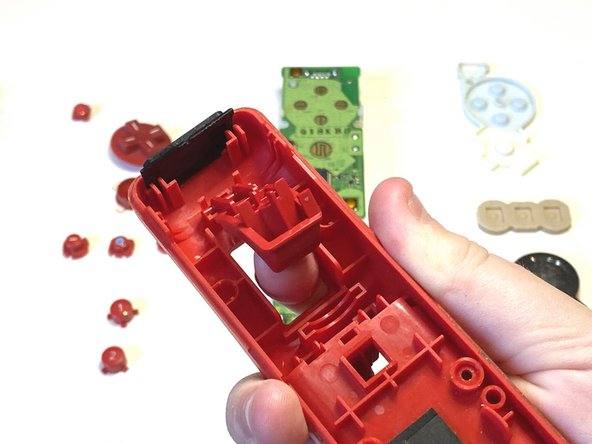
  7. Nintendo Wii Remote Shell Replacement, Taking out the B Button: step 8, image 1 of 3 Nintendo Wii Remote Shell Replacement, Taking out the B Button: step 8, image 2 of 3 Nintendo Wii Remote Shell Replacement, Taking out the B Button: step 8, image 3 of 3
    • Take out the B button

    Ask FixBot

    Add Comment

  8. Nintendo Wii Remote Shell Replacement, Removing the B Button: step 9, image 1 of 2 Nintendo Wii Remote Shell Replacement, Removing the B Button: step 9, image 2 of 2
    • Remove the B Button

    Ask FixBot

    Add Comment

  9. Nintendo Wii Remote Shell Replacement, Getting new shell: step 10, image 1 of 1
    • Grab your new shell

    Ask FixBot

    Add Comment

  10. Nintendo Wii Remote Shell Replacement, Inserting the components: step 11, image 1 of 2 Nintendo Wii Remote Shell Replacement, Inserting the components: step 11, image 2 of 2
    • Insert all of the buttons

    • Make sure they fit in properly and are clickable.

    Ask FixBot

    Add Comment

  11. Nintendo Wii Remote Shell Replacement, Inserting Rubber: step 12, image 1 of 2 Nintendo Wii Remote Shell Replacement, Inserting Rubber: step 12, image 2 of 2
    • Put on all of the rubber on the buttons

    Ask FixBot

    Add Comment

    • Connect the B button

    Ask FixBot

    Add Comment

    • Carfully place the back cover on your wii remote

    Ask FixBot

    Add Comment

  12. Nintendo Wii Remote Shell Replacement, Screwing In: step 15, image 1 of 1
    • Screw in the Y1 Screws into the following places

    Ask FixBot

    Add Comment

Conclusion

Thats it!

Cancel: I did not complete this guide.

5 other people completed this guide.

Artem Ivat

Member since: 02/05/20

3,891 Reputation

13 Guides authored

Team

Kid fixers Member of Kid fixers

Community

217 Members

325 Guides authored

1 Guide Comment

muchas gracias

Aniki Panda - Reply Share

Add Comment

View Statistics:

Past 24 Hours: 6

Past 7 Days: 74

Past 30 Days: 262

All Time: 6,596