Free Shipping on Domestic Orders $75+

Nintendo Wii Remote Motherboard Replacement

What you need

  1. Nintendo Wii Remote Motherboard Replacement, Front Cover Plate and Batteries: step 1, image 1 of 2 Nintendo Wii Remote Motherboard Replacement, Front Cover Plate and Batteries: step 1, image 2 of 2
    • Flip the Wii Remote over so the battery cover faces you.

    • Push up on the bottom tab.

    • Remove the battery cover.

    Ask FixBot

    Add Comment

  2. Nintendo Wii Remote Motherboard Replacement: step 2, image 1 of 1
    • Remove the first battery by pressing down on the positive end and pulling the battery out.

    • Remove the second battery by pushing up on the positive end and pulling the battery out.

    Ask FixBot

    Add Comment

  3. Nintendo Wii Remote Motherboard Replacement: step 3, image 1 of 1
    • Using a tri-point Y1 Screwdriver, remove the two center 7mm screws by turning them counterclockwise.

    • Repeat with the two bottom screws.

    Ask FixBot

    Add Comment

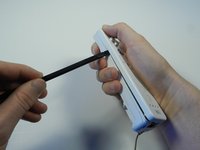
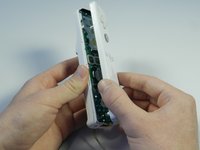
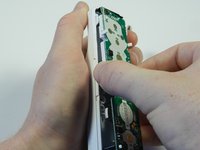
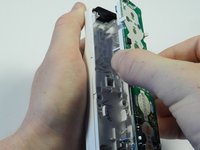
  4. Nintendo Wii Remote Motherboard Replacement: step 4, image 1 of 2 Nintendo Wii Remote Motherboard Replacement: step 4, image 2 of 2
    • With the flat end of a spudger, gently apply pressure to the tabs located on left side of the controller.

    • These tabs are breakable. However, if the tabs are broken the controller will still function.

    • Open the front plate like a book.

    • Small parts may fall out as you open the front plate.

    Ask FixBot

    Add Comment

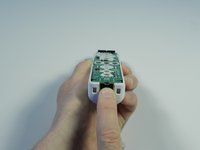
  5. Nintendo Wii Remote Motherboard Replacement, Motherboard: step 5, image 1 of 2 Nintendo Wii Remote Motherboard Replacement, Motherboard: step 5, image 2 of 2
    • Using the connector port, gently lift the motherboard about 2 cm from the base.

    • Electrostatic discharge may damage the device. Be careful and avoid touching the electronic components as much as possible.

    Ask FixBot

    Add Comment

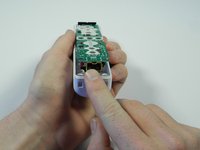
  6. Nintendo Wii Remote Motherboard Replacement: step 6, image 1 of 2 Nintendo Wii Remote Motherboard Replacement: step 6, image 2 of 2
    • Grasp the edges of the motherboard and pull it straight away from the case.

    Ask FixBot

    Add Comment

Conclusion

To reassemble your device, follow these instructions in reverse order.

Cancel: I did not complete this guide.

36 other people completed this guide.

Emily

Member since: 04/14/13

2,015 Reputation

6 Guides authored

Team

Cal Poly, Team 3-44, Amido Spring 2013 Member of Cal Poly, Team 3-44, Amido Spring 2013

CPSU-AMIDO-S13S3G44

4 Members

29 Guides authored

7 Guide Comments

Where do you find a motherboard and how much do they typically cost?

Jeff - Reply Share

This is useless because you can't just buy a motherboard. May as well buy a new remote for $20

Lisa Cole - Reply Share

Where can i buy a brand new and original (not fake of course) wii remote for $20?

arttitudesign - Reply Share

You can buy a first party Wii remote plus for under $50 at Walmart, best buy, or online on Amazon or on Nintendos website

Darren Woloshyn - Reply Share

What is the dimension is the motherboard? I want to make a custom motherboard for the housing but I haven't managed to get int the wiimote yet as I am waiting for my tri screwdriver

Michael baldwin - Reply Share

Add Comment

View Statistics:

Past 24 Hours: 10

Past 7 Days: 94

Past 30 Days: 390

All Time: 40,332