
Toshiba Satellite S55t-A5389 Optical Drive Replacement

William Mazanec and 3 other contributors
Last updated on Jun 24, 2018
Views: 901
View statistics:
- Past 24 Hours:
- 1
- Past 7 Days:
- 10
- Past 30 Days:
- 55
- All Time:
- 901
Comments: 0
No one has left comments on this guide. Will you be first?
Go to guide commentsCompleted: 2 3
2 people have marked this guide "completed." Will you be next?
3 people have marked this guide "completed." Including you — great job!
Favorites: 0 1
No one has favorited (and subscribed to) this guide. Will you be the first?
1 person has favorited (and subscribed to) this guide — and that's you!
Introduction
Go to step 1 ↓If your optical drive is no longer reading CDs, or not ejecting when the button is pressed, then it may be time to replace it. Be sure to try another CD just to check that it is in fact the optical drive malfunctioning, and not a scratched CD being the issue.
What you need
Parts
Tools


-
-
-
Remove the fourteen 5mm Phillips #0 screws from the bottom of the laptop.
 Ask FixBot
-
-
-
-
Using the plastic prying tools, go around the edge of the back of the laptop to release the back cover.
-
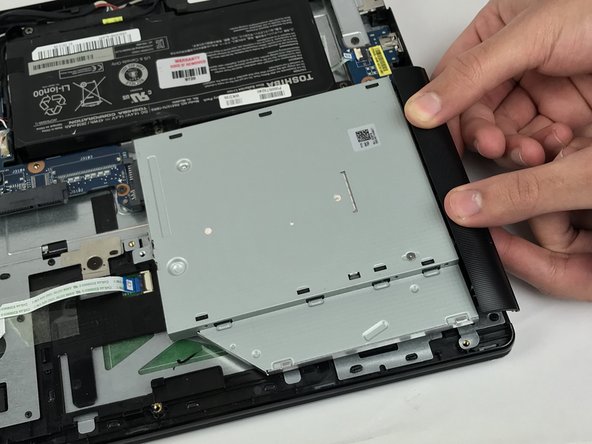
Pull the drive outwards to remove it.
-
-




To reassemble your device, follow these instructions in reverse order.
Cancel: I did not complete this guide.
2 other people completed this guide.

Team

USF Tampa, Team S5-G6, Passmore Spring 2018 Member of USF Tampa, Team S5-G6, Passmore Spring 2018
USFT-PASSMORE-S18S5G6
3 Members
96 Guides authored
