Free Shipping on Domestic Orders $75+

iPhone 16 Pro Pentalobe Screws Removal

Views: 218

View statistics:

Past 24 Hours:
1
Past 7 Days:
6
Past 30 Days:
20
All Time:
218
Comments: 1

1 comment on steps.

Completed: 0

No one has marked this guide "completed." Will you be the first?

Favorites: 0

No one has favorited (and subscribed to) this guide. Will you be the first?

Time Required: No estimate
Difficulty: Moderate
iPhone 16 Pro Pentalobe Screws Removal
Prerequisite Only This is a prerequisite-only guide! This guide is part of another procedure and isn’t meant to be used alone.

Introduction

Go to step 1 ↓

Prerequisite guide to remove the pentalobe screws in an iPhone 16 Pro.

What you need

Tools

    1. iPhone 16 Pro Pentalobe Screws Removal, Prepare the phone for disassembly: step 1, image 1 of 2 iPhone 16 Pro Pentalobe Screws Removal, Prepare the phone for disassembly: step 1, image 2 of 2
      • Allow the phone's battery to drain below 25%, as a charged lithium-ion battery is a potential safety hazard.

      • Unplug any cables from the phone.

      • Hold the power and either volume buttons and slide to power off the phone.

      Ask FixBot

      Add Comment

    2. iPhone 16 Pro Pentalobe Screws Removal, Tape over any cracks: step 2, image 1 of 2 iPhone 16 Pro Pentalobe Screws Removal, Tape over any cracks: step 2, image 2 of 2
      • If the screen or back glass is badly cracked, lay overlapping strips of packing tape over the glass to protect yourself and make disassembly easier.

      • Make sure there's a smooth area near the bottom edge that's big enough for a suction cup to stick to.

      Ask FixBot

      Add Comment

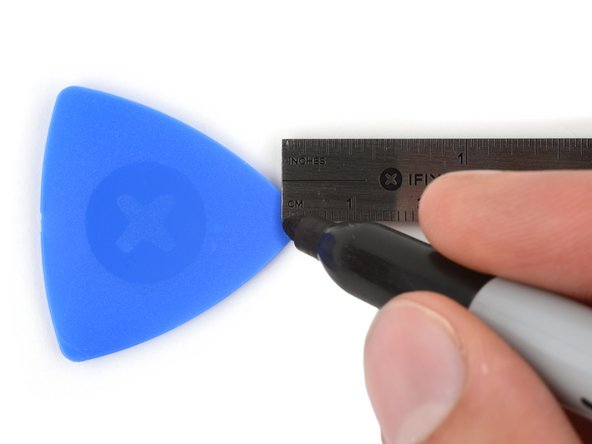
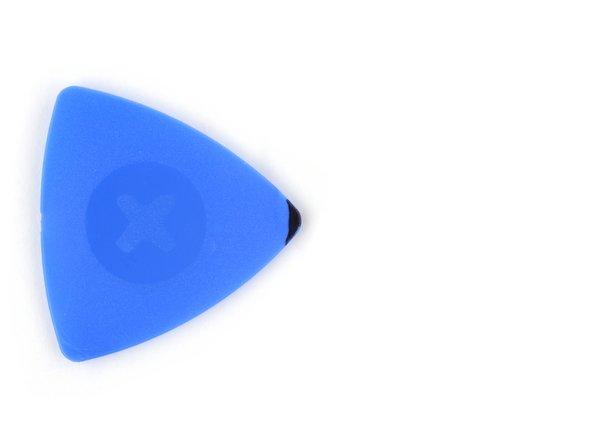
    3. iPhone 16 Pro Pentalobe Screws Removal, Mark your opening picks: step 3, image 1 of 3 iPhone 16 Pro Pentalobe Screws Removal, Mark your opening picks: step 3, image 2 of 3 iPhone 16 Pro Pentalobe Screws Removal, Mark your opening picks: step 3, image 3 of 3
      • If inserted too far, an opening pick can damage your device. Follow this step to mark your pick and prevent damage.

      • Measure 3 mm from the tip and mark the opening pick with a permanent marker.

      • You can also mark the other corners of the pick with different measurements.

      • Alternatively, tape a coin to a pick 3 mm from the tip.

      Ask FixBot

      Add Comment

    4. iPhone 16 Pro Pentalobe Screws Removal, Remove the pentalobe screws: step 4, image 1 of 2 iPhone 16 Pro Pentalobe Screws Removal, Remove the pentalobe screws: step 4, image 2 of 2
      • Use a P2 pentalobe screwdriver to remove the two 7.4 mm‑long screws on either side of the USB-C port.

      Ask FixBot

      Add Comment

Conclusion

To reassemble your device, follow these instructions in reverse order.

Cancel: I did not complete this guide.

Nick Schultz

Member since: 03/24/24

69,546 Reputation

363 Guides authored

Team

iFixit Member of iFixit

Staff

121 Members

72,931 Guides authored

0 Guide Comments

Add Comment

View Statistics:

Past 24 Hours: 1

Past 7 Days: 6

Past 30 Days: 20

All Time: 218