Free Shipping on Domestic Orders $75+

Skil X-Drive 18V Cordless Drill Model No. 2887 Handle Replacement

What you need

    1. Skil X-Drive 18V Cordless Drill Model No. 2887 Handle Replacement, Un-clip Battery: step 1, image 1 of 1
      • Grip the drill. Locate the red locking switch on the back of the battery. Hold the switch down.

      Ask FixBot

      Add Comment

    2. Skil X-Drive 18V Cordless Drill Model No. 2887 Handle Replacement, Remove Battery: step 2, image 1 of 3 Skil X-Drive 18V Cordless Drill Model No. 2887 Handle Replacement, Remove Battery: step 2, image 2 of 3 Skil X-Drive 18V Cordless Drill Model No. 2887 Handle Replacement, Remove Battery: step 2, image 3 of 3
      • While holding down the red locking switch, slide the battery towards the back of the drill until the battery is fully removed from the drill.

      Ask FixBot

      Add Comment

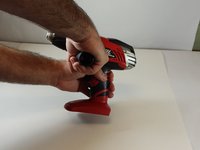
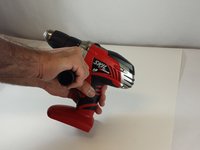
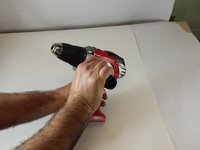
    1. Skil X-Drive 18V Cordless Drill Model No. 2887 Handle Replacement, Remove Handle: step 3, image 1 of 3 Skil X-Drive 18V Cordless Drill Model No. 2887 Handle Replacement, Remove Handle: step 3, image 2 of 3 Skil X-Drive 18V Cordless Drill Model No. 2887 Handle Replacement, Remove Handle: step 3, image 3 of 3
      • Grip cordless drill firmly with left hand. Grip the cordless drill handle firmly with the right hand. Rotate the handle counterclockwise in order to remove the handle from the drill.

      Ask FixBot

      Add Comment

Conclusion

To reassemble your device, follow these instructions in reverse order.

Cancel: I did not complete this guide.

Sean

Member since: 09/23/14

309 Reputation

2 Guides authored

Team

USF Tampa, Team 2-3, Blackwell Fall 2014 Member of USF Tampa, Team 2-3, Blackwell Fall 2014

USFT-BLACKWELL-F14S2G3

5 Members

9 Guides authored

0 Guide Comments

Add Comment

View Statistics:

Past 24 Hours: 1

Past 7 Days: 8

Past 30 Days: 42

All Time: 818