Introduction
Use this guide to replace the SIM card.
What you need
-
-
-
Gently insert a plastic opening tool between the rear panel and the inner rear frame near the rear-facing camera.
-
Use your plastic opening tool to pry up the rear case around the perimeter of the Nexus S.
 Ask FixBot
-
-
-
-
-
-
Using the edge of a plastic opening tool, lift the battery from the end closest to the headphone jack.
-
Remove the battery from the Nexus S.
-
-
-
-
-
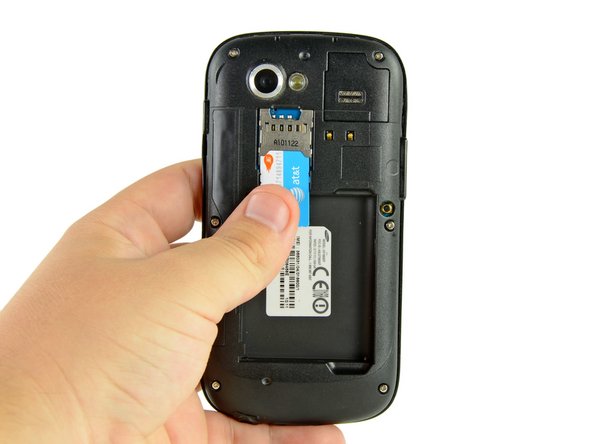
Use your thumb to slide the SIM card downwards from the SIM card slot.
-
Remove the SIM card.
-
-




To reassemble your device, follow these instructions in reverse order.
Cancel: I did not complete this guide.
7 other people completed this guide.

