
Motorola Razr V3 Camera Replacement

Christian and
Last updated on May 7, 2024
Views: 2.9K
View statistics:
- Past 24 Hours:
- 4
- Past 7 Days:
- 26
- Past 30 Days:
- 104
- All Time:
- 2,904
Comments: 4
4 comments on steps.
Completed: 2 3
2 people have marked this guide "completed." Will you be next?
3 people have marked this guide "completed." Including you — great job!
Favorites: 1 2
1 person has favorited (and subscribed to) this guide. Will you be next?
2 people have favorited (and subscribed to) this guide — including you!
Featured Student Guide
This guide has been the hard work of our awesome students and is found to be exceptionally cool by the iFixit staff.
Introduction
Go to step 1 ↓This guide will show you how to install the Motorola Razr V3 camera. You may need to install a new camera if the camera doesn't show any picture or otherwise does not work.
What you need
Tools


Video Overview
-
-
-
Remove the back cover by pressing down the silver button.
-
Pull the cover away from the phone.
 Ask FixBot
-
-
-
Remove the battery by pushing down on the top and pulling it away from the phone.
-
-
-
-
Tool used on this step:Tweezers$4.99
-
Use tweezers to pry off the four rubber screw covers from the inside face.
-
-
-
-
-
Tool used on this step:Tweezers$4.99
-
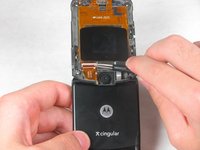
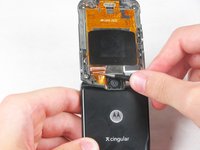
Use tweezers to flip up the ZIF tab on the camera ribbon cable socket.
-
Gently pull the camera ribbon cable out of the ZIF socket.
-
-



To reassemble your device, follow these instructions in reverse order.
Cancel: I did not complete this guide.
2 other people completed this guide.

Team

Cal Poly, Team 3-46, Amido Spring 2013 Member of Cal Poly, Team 3-46, Amido Spring 2013
CPSU-AMIDO-S13S3G46
4 Members
96 Guides authored
