
Motorola Moto G6 Back Shell Replacement

William Ng and one other contributor
Last updated on May 11, 2020
Views: 71
View statistics:
- Past 24 Hours:
- 0
- Past 7 Days:
- 2
- Past 30 Days:
- 7
- All Time:
- 71
Comments: 0
No one has left comments on this guide. Will you be first?
Go to guide commentsCompleted: 0 1
No one has marked this guide "completed." Will you be the first?
1 person has marked this guide "completed." It's you — great job!
Favorites: 0 1
No one has favorited (and subscribed to) this guide. Will you be the first?
1 person has favorited (and subscribed to) this guide — and that's you!
Introduction
Go to step 1 ↓Note: This is an archived guide retained for historical purposes. For the updated guide, go here.
The Motorola Moto G6 features a glass back shell. This often leads to a easily damaged back shell, including scratches or cracks. The back shell holds the device together and protects the device’s interior. Damages to the back shell may eventually cause damage to the device’s interior. If the back shell is severely damaged, a back shell replacement is suggested.
This guide teaches how to perform a back shell replacement. No repair experience is required. However, this replacement will require tools to pry the back shell open. The specific device model in this guide is XT1925-12. Other model numbers include: XT1925-4, XT1925-5, XT1925-6, and XT1925DL.
Before beginning the repair, make sure the device is turned off and disconnected from an external power source. Gather the suggested tools listed below and a new Motorola Moto G6 glass back shell.
What you need
Tools


-
-
-
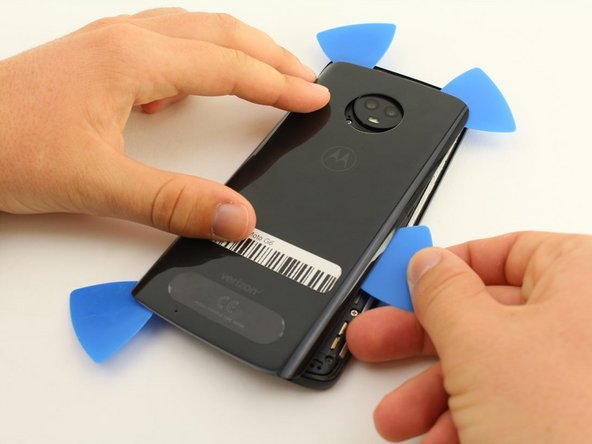
Use the iFixit opening tools to gently wedge between the back shell and the rest of the device.
-
Focus on lifting up the corners of the back shell so that there is space to insert iFixit opening picks.
 Ask FixBot
-
-
-
-
Slide the picks along the edges of the device until the adhesive loosens and allows the cover to come off.
-
There is adhesive all the way around the camera lens.
-
Gently remove the back cover.
-
-




To reassemble your device, place the back shell over the device, and apply pressure on all sides to seal it.

Team

Cal Poly, Team S11-G1, Regan Fall 2019 Member of Cal Poly, Team S11-G1, Regan Fall 2019
CPSU-REGAN-F19S11G1
4 Members
96 Guides authored
