Introduction
This is a prerequisite guide that details the removal of the Heyday Wireless Speaker 8125's internal black plastic cover. This guide is required in order to access the inner components of this device.
In addition, the black plastic cover surrounds the actual speaker so you will need to disconnect the speaker cable below if you need to remove the black cover.
What you need
-
-
Orient the speaker so that it is sitting upright.
-
Use your nondominant hand to hold the speaker in place while you firmly push the plastic spudger into the seam between the device wall and the grille.
-
Push down with the plastic spudger and lift the grill until you feel it separate from the speaker.
-
Gently remove it from the top of the device.
 Ask FixBot
-
-
-
Tool used on this step:Tweezers$4.99
-
Use tweezers to remove the four black rubber screw covers.
-
Use a Phillips screwdriver to remove four 8.9 mm screws underneath the screw covers.
-
Once all four screws are out, gently pull the black cover out using your hands or use a spudger to pry it out.
-


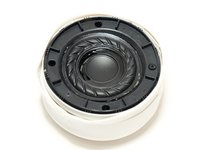


To reassemble your device, follow these instructions in reverse order.

Team

Linn Benton Community College, Team 1-1, Karnes Winter 2023 Member of Linn Benton Community College, Team 1-1, Karnes Winter 2023
LBCC-KARNES-W23S1G1
4 Members
16 Guides authored
