Free Shipping on Domestic Orders $75+

Motorola Droid RAZR Display Assembly Replacement

Views: 64K

View statistics:

Past 24 Hours:
2
Past 7 Days:
21
Past 30 Days:
94
All Time:
63,997
Comments: 18

17 comments on steps, 1 guide comment.

Go to guide comments
Completed: 49

49 people have marked this guide "completed." Will you be next?

Favorites: 51

51 people have favorited (and subscribed to) this guide. Will you be next?

Time Required: No estimate
Difficulty: Difficult
Featured Guide

This guide has been found to be exceptionally cool by the iFixit staff.

Motorola Droid RAZR Display Assembly Replacement

Introduction

Go to step 1 ↓

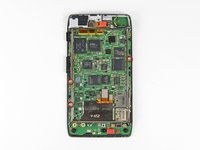
Did you heave your Droid RAZR through a metropolitan area in an attempt to recreate the lamppost slicing skills Motorola showed in their commercials? No? Well, even if you only dropped your phone down a couple flights of stairs, this guide will show you how to replace the display assembly.

The LCD and digitizer are fused to the display glass, so the entire unit must be replaced as one piece.

What you need

Tools

    1. Motorola Droid RAZR Display Assembly Replacement, Back Cover: step 1, image 1 of 2 Motorola Droid RAZR Display Assembly Replacement, Back Cover: step 1, image 2 of 2
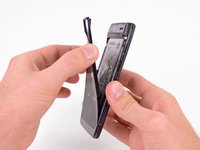
      • Insert a plastic opening tool between the back cover and rear case at the lower left edge of the back cover.

      • Pry the back cover up with the plastic opening tool to free the plastic clips.

      • Continue prying along the left edge of the back cover towards the top of the phone.

      Ask FixBot

      Add Comment

    2. Motorola Droid RAZR Display Assembly Replacement: step 2, image 1 of 3 Motorola Droid RAZR Display Assembly Replacement: step 2, image 2 of 3 Motorola Droid RAZR Display Assembly Replacement: step 2, image 3 of 3
      • Work the plastic opening tool across the top of the back case to free the plastic clips.

      • The top edge of the back case is very thin. Pry carefully to avoid cracking or snapping it.

      • Continue prying down the right side of the back cover to free the remaining clips.

      Ask FixBot

      Add Comment

    3. Motorola Droid RAZR Display Assembly Replacement: step 3, image 1 of 3 Motorola Droid RAZR Display Assembly Replacement: step 3, image 2 of 3 Motorola Droid RAZR Display Assembly Replacement: step 3, image 3 of 3
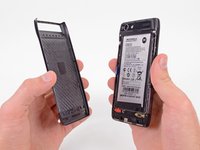
      • Pull the back cover away from the phone to remove it.

      • The back cover is attached to the battery with a generous amount of adhesive, so you may have to use quite a bit of force to separate the two pieces.

      • The battery must remain in the phone and not come off with the back cover or you will break the power lead.

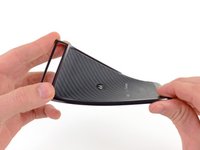
      • Since the back cover is made of Kevlar, it can handle a fair amount of twisting and tugging without breaking.

      Ask FixBot

      Add Comment

    1. Motorola Droid RAZR Display Assembly Replacement, Battery: step 4, image 1 of 2 Motorola Droid RAZR Display Assembly Replacement, Battery: step 4, image 2 of 2
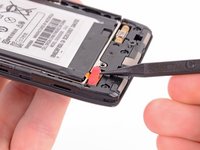
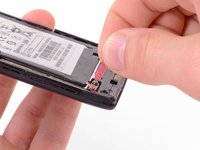
      • Use the tip of a spudger to lift up the red silicone cover over the battery terminal screws and remove it.

      Ask FixBot

      Add Comment

    2. Motorola Droid RAZR Display Assembly Replacement: step 5, image 1 of 3 Motorola Droid RAZR Display Assembly Replacement: step 5, image 2 of 3 Motorola Droid RAZR Display Assembly Replacement: step 5, image 3 of 3
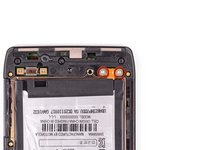
      • Remove the two 3.3 mm T5 Torx battery terminal screws.

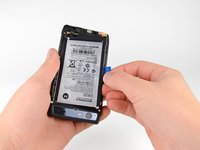
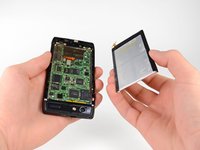
      • Grab the blue battery removal tab and lift the battery out to remove it.

      • There is quite a bit of adhesive securing the battery to the motherboard. Work slowly to avoid deforming the battery.

      • Your phone will have a number of metal EMI shields on the motherboard, rather than the bare ICs seen here.

      Ask FixBot

      Add Comment

    1. Motorola Droid RAZR Display Assembly Replacement, Camera Cover: step 6, image 1 of 2 Motorola Droid RAZR Display Assembly Replacement, Camera Cover: step 6, image 2 of 2
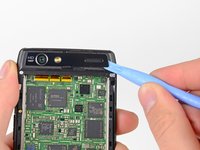
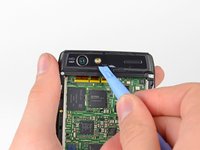
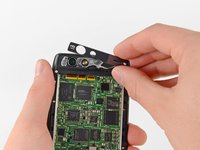
      • Use a heat gun or hair dryer to soften the adhesive underneath the camera cover.

      • The following steps were performed without the use of a heat gun. Notice that the camera cover cracks very easily if you do not heat the adhesive that holds it in place.

      • Gently pry up the bottom edge of the camera cover with a plastic opening tool.

      • Carefully slide the plastic opening tool across the bottom edge to free it from the adhesive.

      • Continue to use the heat gun as needed to soften the adhesive as you remove the camera cover.

      Ask FixBot

      Add Comment

    2. Motorola Droid RAZR Display Assembly Replacement: step 7, image 1 of 3 Motorola Droid RAZR Display Assembly Replacement: step 7, image 2 of 3 Motorola Droid RAZR Display Assembly Replacement: step 7, image 3 of 3
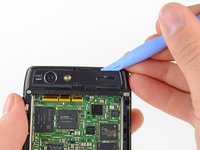
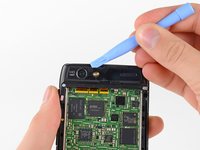
      • Insert the plastic opening tool underneath the top edge of the camera cover.

      • Gently pry the camera cover up as you slide the plastic opening tool across the top edge to free it from the adhesive.

      • Remove the camera cover.

      Ask FixBot

      Add Comment

    1. Motorola Droid RAZR Display Assembly Replacement, Rear Case: step 8, image 1 of 1
      • Remove the six screws securing the rear case to the rest of the phone:

      • three 6.7 mm silver T3 Torx screws at the top,

      • four 4.0 mm gold T3 Torx screws in the middle,

      • and three 4.5 mm black T5 Torx screws at the bottom.

      Ask FixBot

      Add Comment

    2. Motorola Droid RAZR Display Assembly Replacement: step 9, image 1 of 3 Motorola Droid RAZR Display Assembly Replacement: step 9, image 2 of 3 Motorola Droid RAZR Display Assembly Replacement: step 9, image 3 of 3
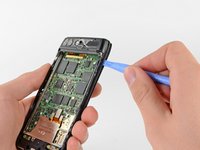
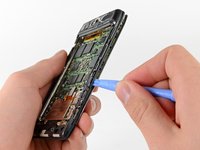
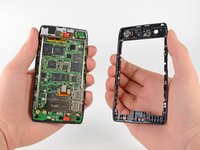
      • Insert a plastic opening tool between the rear case and the motherboard assembly.

      • Work your way down the side of the phone and gently pry the rear case up.

      • Separate the rear case from the motherboard assembly.

      Ask FixBot

      Add Comment

    1. Motorola Droid RAZR Display Assembly Replacement, Motherboard Assembly: step 10, image 1 of 2 Motorola Droid RAZR Display Assembly Replacement, Motherboard Assembly: step 10, image 2 of 2
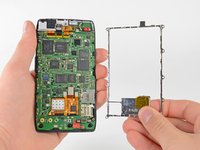
      • Remove the three 2.5 mm T3 Torx screws securing the metal chassis to the motherboard.

      • Remove the metal chassis from the motherboard assembly.

      Ask FixBot

      Add Comment

    2. Motorola Droid RAZR Display Assembly Replacement: step 11, image 1 of 2 Motorola Droid RAZR Display Assembly Replacement: step 11, image 2 of 2
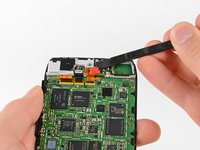
      • Use the flat end of a spudger to remove the two red silicone microphone covers at the top and bottom of the motherboard.

      Ask FixBot

      Add Comment

    3. Motorola Droid RAZR Display Assembly Replacement: step 12, image 1 of 1
      • There is a small metal shield that covers the display assembly cable connectors on the motherboard. This shield is held in place by a few small clips that attach to the surrounding EMI shields.

      • Use the tip of a spudger to gently bend the clips out of shape and remove the shield.

      Ask FixBot

      Add Comment

    4. Motorola Droid RAZR Display Assembly Replacement: step 13, image 1 of 3 Motorola Droid RAZR Display Assembly Replacement: step 13, image 2 of 3 Motorola Droid RAZR Display Assembly Replacement: step 13, image 3 of 3
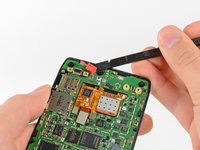
      • Use the flat end of a spudger to pry the three display cable connectors off their sockets on the motherboard.

      Ask FixBot

      Add Comment

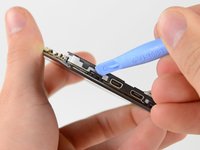
    5. Motorola Droid RAZR Display Assembly Replacement: step 14, image 1 of 2 Motorola Droid RAZR Display Assembly Replacement: step 14, image 2 of 2
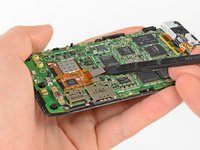
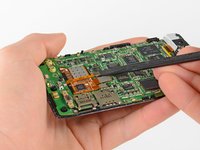
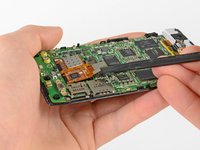
      • There are a number of small black plastic clips on the display assembly that hold the motherboard in place.

      • Release the securing clips with a plastic opening tool.

      Ask FixBot

      Add Comment

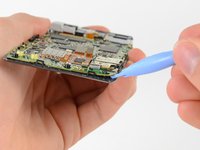
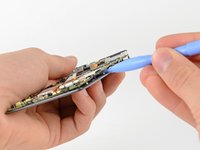
    6. Motorola Droid RAZR Display Assembly Replacement: step 15, image 1 of 3 Motorola Droid RAZR Display Assembly Replacement: step 15, image 2 of 3 Motorola Droid RAZR Display Assembly Replacement: step 15, image 3 of 3
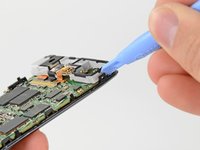
      • Use a heat gun or hair dryer to soften the adhesive strip around the perimeter of the motherboard.

      • Pry the edges of the motherboard up from the display assembly with a plastic opening tool.

      • Remove the motherboard assembly.

      Ask FixBot

      Add Comment

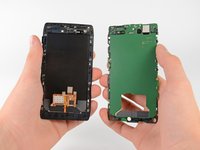
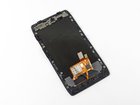
    1. Motorola Droid RAZR Display Assembly Replacement, Display Assembly: step 16, image 1 of 1
      • Once separated from the motherboard assembly, the entire display assembly can be replaced.

      Ask FixBot

      Add Comment

Conclusion

To reassemble your device, follow these instructions in reverse order.

Cancel: I did not complete this guide.

49 other people completed this guide.

David Hodson

Member since: 04/13/10

157,207 Reputation

127 Guides authored

1 Guide Comment

if the problem is charging point what should i do?

emmanuel.rambo75 - Reply Share

Add Comment

View Statistics:

Past 24 Hours: 2

Past 7 Days: 21

Past 30 Days: 94

All Time: 63,997