Free Shipping on Domestic Orders $75+

This translation was generated by a machine and has not been reviewed by a person yet. Speak this language? Review it.

Modixia Cooling Fan Block Preparation - Infinity PC

Prerequisite Only
This is a prerequisite-only guide! This guide is part of another procedure and isn’t meant to be used alone.
    1. Modixia Cooling Fan Block Preparation - Infinity PC, Block Preparation: step 1, image 1 of 3 Modixia Cooling Fan Block Preparation - Infinity PC, Block Preparation: step 1, image 2 of 3 Modixia Cooling Fan Block Preparation - Infinity PC, Block Preparation: step 1, image 3 of 3
      • Take an Infinity block.

      • Clean off any debris to ensure proper mounting (image 2).

      • Place 2 M2 inserts on the front of the block (image 3).

      Ask FixBot

      Add Comment

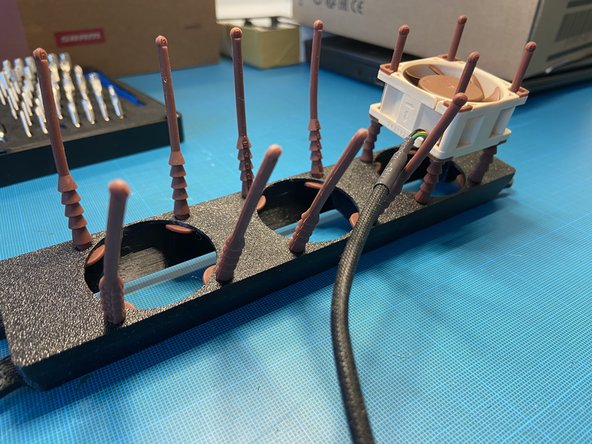
    2. Modixia Cooling Fan Block Preparation - Infinity PC, Installing the pegs: step 2, image 1 of 3 Modixia Cooling Fan Block Preparation - Infinity PC, Installing the pegs: step 2, image 2 of 3 Modixia Cooling Fan Block Preparation - Infinity PC, Installing the pegs: step 2, image 3 of 3
      • Place the brown plastic pegs (images 1 and 2).

      • Press them in (image 3).

      Ask FixBot

      Add Comment

    3. Modixia Cooling Fan Block Preparation - Infinity PC, Cooling fan installation: step 3, image 1 of 3 Modixia Cooling Fan Block Preparation - Infinity PC, Cooling fan installation: step 3, image 2 of 3 Modixia Cooling Fan Block Preparation - Infinity PC, Cooling fan installation: step 3, image 3 of 3
      • Orient the cooling fans correctly (with their label facing toward the inside of the block) (image 1).

      • The cooling fan cables must be positioned at the bottom of the block (image 3).

      • Insert them as far as possible so that the cooling fans are securely against the block.

      Ask FixBot

      Add Comment

    4. Modixia Cooling Fan Block Preparation - Infinity PC, Block Cleaning: step 4, image 1 of 2 Modixia Cooling Fan Block Preparation - Infinity PC, Block Cleaning: step 4, image 2 of 2
      • Trim the excess ends (image 2).

      • Place the grille onto the cooling fan block (image 3).

      Ask FixBot

      Add Comment

    5. Modixia Cooling Fan Block Preparation - Infinity PC, Anti-dust mesh: step 5, image 1 of 2 Modixia Cooling Fan Block Preparation - Infinity PC, Anti-dust mesh: step 5, image 2 of 2
      • Install 2 M2 Phillips screws.

      Ask FixBot

      Add Comment

Conclusion

To reassemble your device, follow the instructions in reverse order.

Cancel: I did not complete this guide.

Modixia

Member since: 07/01/24

1,954 Reputation

9 Guides authored

0 Guide Comments

Add Comment

View Statistics:

Past 24 Hours: 1

Past 7 Days: 2

Past 30 Days: 8

All Time: 56