Free Shipping on Domestic Orders $75+

Microsoft Xbox Series X Pulse Controller Thumbstick Cover Replacement

What you need

    1. Microsoft Xbox Series X Pulse Controller Thumbstick Cover Replacement, Thumbstick Covers: step 1, image 1 of 3 Microsoft Xbox Series X Pulse Controller Thumbstick Cover Replacement, Thumbstick Covers: step 1, image 2 of 3 Microsoft Xbox Series X Pulse Controller Thumbstick Cover Replacement, Thumbstick Covers: step 1, image 3 of 3
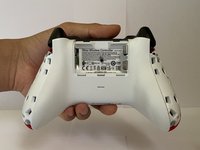
      • Remove the battery pack cover.

      • If there are any batteries inside of it, remove them.

      Ask FixBot

      Add Comment

    2. Microsoft Xbox Series X Pulse Controller Thumbstick Cover Replacement: step 2, image 1 of 3 Microsoft Xbox Series X Pulse Controller Thumbstick Cover Replacement: step 2, image 2 of 3 Microsoft Xbox Series X Pulse Controller Thumbstick Cover Replacement: step 2, image 3 of 3
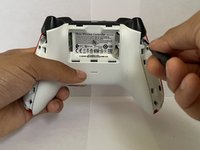
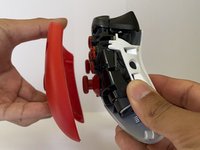
      • Place an iFixit opening tool between the seam of both the front and side plates.

      • Move the tool repeatedly along the seam between the two plates until the side plate is wholly disconnected from the front plate.

      Ask FixBot

      Add Comment

    3. Microsoft Xbox Series X Pulse Controller Thumbstick Cover Replacement: step 3, image 1 of 3 Microsoft Xbox Series X Pulse Controller Thumbstick Cover Replacement: step 3, image 2 of 3 Microsoft Xbox Series X Pulse Controller Thumbstick Cover Replacement: step 3, image 3 of 3
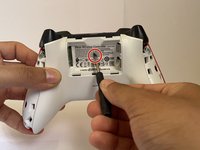
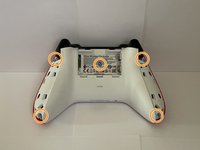
      • Remove or pick a hole on the warranty sticker label to reveal the center screw.

      • Remove all five screws from the backplate using a TR8 Torx screwdriver.

      Ask FixBot

      Add Comment

    4. Microsoft Xbox Series X Pulse Controller Thumbstick Cover Replacement: step 4, image 1 of 3 Microsoft Xbox Series X Pulse Controller Thumbstick Cover Replacement: step 4, image 2 of 3 Microsoft Xbox Series X Pulse Controller Thumbstick Cover Replacement: step 4, image 3 of 3
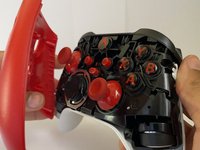
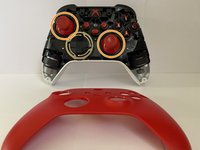
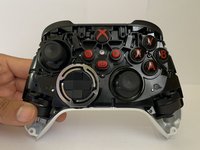
      • Remove the front plate from the controller.

      Ask FixBot

      Add Comment

    5. Microsoft Xbox Series X Pulse Controller Thumbstick Cover Replacement: step 5, image 1 of 3 Microsoft Xbox Series X Pulse Controller Thumbstick Cover Replacement: step 5, image 2 of 3 Microsoft Xbox Series X Pulse Controller Thumbstick Cover Replacement: step 5, image 3 of 3
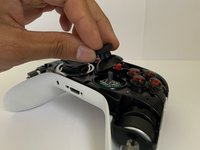
      • Pop-out the old thumbsticks and connect the new thumbsticks to the joystick.

      Ask FixBot

      Add Comment

Conclusion

To reassemble your device, follow these instructions in reverse order.

Cancel: I did not complete this guide.

19 other people completed this guide.

Edgar Galindo

Member since: 03/20/22

579 Reputation

1 Guide authored

Team

4 Guide Comments

Does this method fix joystick drift?

Aaron - Reply Share

@aaron73239 , to fix the joystick drift, you might want to try this guide.

Kris Rodriguez - Reply Share

Where is the article addressing stick-drift/replacement, if this is not it?

Pictory - Reply Share

Perhaps it is this article? Xbox One Wireless Controller Model 1708 Button Replacement
Would be appreciated if someone with relevant knowledge or experience would confirm this.

Pictory - Reply Share

Add Comment

View Statistics:

Past 24 Hours: 16

Past 7 Days: 91

Past 30 Days: 415

All Time: 32,618