Free Shipping on Domestic Orders $75+

Microsoft Surface Pro X Sensor Bar Lift

Prerequisite Only
This is a prerequisite-only guide! This guide is part of another procedure and isn’t meant to be used alone.

What you need

    1. Microsoft Surface Pro X Sensor Bar Lift, Remove the front-facing sensor bar screws: step 1, image 1 of 1
      • Depending on what component you are repairing, different shields on the motherboard may be removed at this point. For example, the shield covering the rear-facing camera connector has been removed in this step's image.

      • Use a T3 Torx screwdriver to remove the eight 5.5 mm screws securing the front-facing sensor bar.

      Ask FixBot

      Add Comment

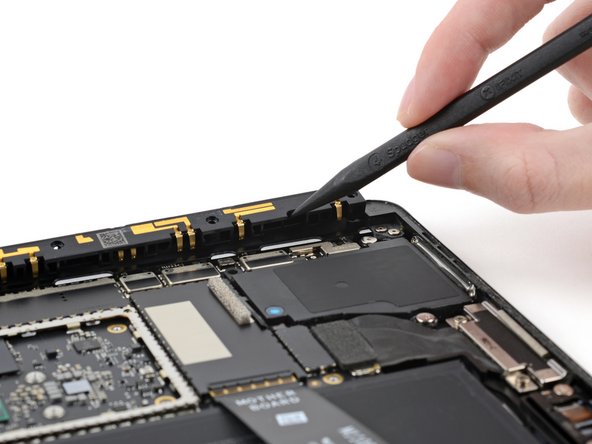
    2. Microsoft Surface Pro X Sensor Bar Lift, Dislodge the front-facing sensor bar: step 2, image 1 of 2 Microsoft Surface Pro X Sensor Bar Lift, Dislodge the front-facing sensor bar: step 2, image 2 of 2
      • Insert the pointed end of a spudger into the gap on the right side of the sensor bar between the rightmost screw hole and the adjacent screw hole.

      • Lift up the right side of the sensor bar to dislodge it from the frame.

      • You only need to lift the sensor bar so that it is loose in the frame. Don't try to remove the front sensor bar—it is still attached to the Surface by a cable that connects under the motherboard.

      Ask FixBot

      Add Comment

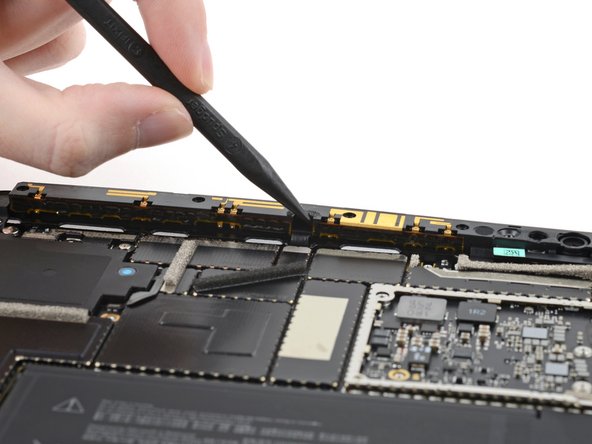
    3. Microsoft Surface Pro X Sensor Bar Lift: step 3, image 1 of 2 Microsoft Surface Pro X Sensor Bar Lift: step 3, image 2 of 2
      • Repeat the last step for the gap in the sensor bar between the second and third screw hole from the left.

      • This gap is where the sensor bar's cable is located.

      Ask FixBot

      Add Comment

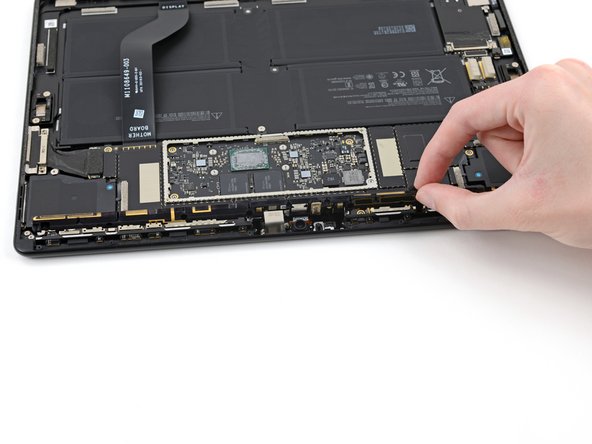
    4. Microsoft Surface Pro X Sensor Bar Lift, Lift the front-facing sensor bar: step 4, image 1 of 2 Microsoft Surface Pro X Sensor Bar Lift, Lift the front-facing sensor bar: step 4, image 2 of 2
      • Lift the sensor bar 90° so that it's perpendicular to the frame.

      • Don't push the sensor bar past 90° and don't rotate it horizontally to avoid damaging the cable connecting it to the motherboard.

      Ask FixBot

      Add Comment

Conclusion

To reassemble your device, follow these instructions in reverse order.

Cancel: I did not complete this guide.

Kyle Smith

Member since: 02/01/21

53,242 Reputation

124 Guides authored

0 Guide Comments

Add Comment

View Statistics:

Past 24 Hours: 0

Past 7 Days: 3

Past 30 Days: 7

All Time: 165