Free Shipping on Domestic Orders $75+

Microsoft Surface Pro X Rear Camera Shield Replacement

Prerequisite Only
This is a prerequisite-only guide! This guide is part of another procedure and isn’t meant to be used alone.

What you need

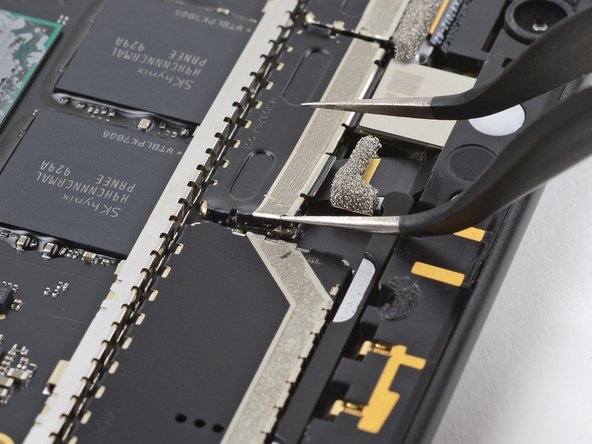
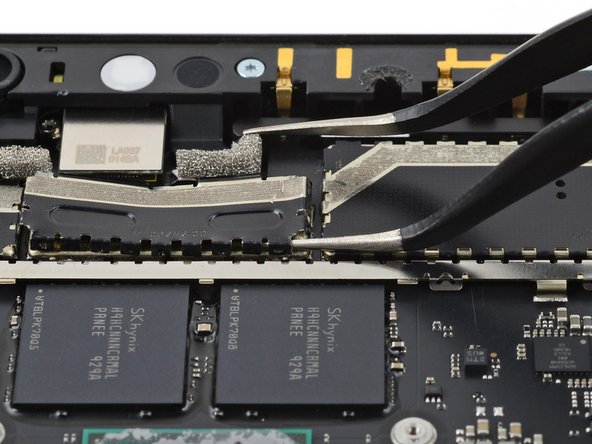
    1. Microsoft Surface Pro X Rear Camera Shield Replacement, Remove the rear camera shield: step 1, image 1 of 2 Microsoft Surface Pro X Rear Camera Shield Replacement, Remove the rear camera shield: step 1, image 2 of 2
      Tool used on this step:
      Tweezers
      $4.99
      Buy
      • Insert one tine of a pair of pointed tweezers under one corner of the shield covering the rear camera connector.

      • Lift up the corner to detach it from the frame.

      • If you are going to reuse this shield, try to avoid excessively bending it during removal.

      Ask FixBot

      Add Comment

    2. Microsoft Surface Pro X Rear Camera Shield Replacement: step 2, image 1 of 3 Microsoft Surface Pro X Rear Camera Shield Replacement: step 2, image 2 of 3 Microsoft Surface Pro X Rear Camera Shield Replacement: step 2, image 3 of 3
      • Repeat the previous step for the remaining three corners of the shield.

      Ask FixBot

      Add Comment

    3. Microsoft Surface Pro X Rear Camera Shield Replacement: step 3, image 1 of 2 Microsoft Surface Pro X Rear Camera Shield Replacement: step 3, image 2 of 2
      • Use a pair of pointed tweezers to lift up the left side of the shield.

      Ask FixBot

      Add Comment

    4. Microsoft Surface Pro X Rear Camera Shield Replacement: step 4, image 1 of 2 Microsoft Surface Pro X Rear Camera Shield Replacement: step 4, image 2 of 2
      • Slide one tine of a pair of pointed tweezers under the bottom right edge of the shield to fully detach it from the frame.

      Ask FixBot

      Add Comment

    5. Microsoft Surface Pro X Rear Camera Shield Replacement: step 5, image 1 of 1
      • Remove the shield covering the rear camera connector.

      • If the shield isn't completely detached from the frame, pry up additional areas on the edges of the shield.

      Ask FixBot

      Add Comment

Conclusion

To reassemble your device, follow these instructions in reverse order.

Cancel: I did not complete this guide.

Kyle Smith

Member since: 02/01/21

53,242 Reputation

124 Guides authored

0 Guide Comments

Add Comment

View Statistics:

Past 24 Hours: 0

Past 7 Days: 4

Past 30 Days: 12

All Time: 205