Free Shipping on Domestic Orders $75+

Microsoft Surface Laptop 4 (15-inch) Feet Replacement

What you need

    1. Microsoft Surface Laptop 4 (15-inch) Feet Replacement, Flip the laptop over: step 1, image 1 of 2 Microsoft Surface Laptop 4 (15-inch) Feet Replacement, Flip the laptop over: step 1, image 2 of 2
      • Close the screen and lay your laptop down with the rear case facing up to access the four rubber feet.

      Ask FixBot

      Add Comment

    2. Microsoft Surface Laptop 4 (15-inch) Feet Replacement, Feet removal information: step 2, image 1 of 3 Microsoft Surface Laptop 4 (15-inch) Feet Replacement, Feet removal information: step 2, image 2 of 3 Microsoft Surface Laptop 4 (15-inch) Feet Replacement, Feet removal information: step 2, image 3 of 3
      • Each foot has a recess to help pry it from the laptop:

      • The back feet recesses are closest to the back edge of the laptop.

      • The front feet recesses are closest to the front edge of the laptop.

      Ask FixBot

      Add Comment

    3. Microsoft Surface Laptop 4 (15-inch) Feet Replacement, Remove the feet: step 3, image 1 of 3 Microsoft Surface Laptop 4 (15-inch) Feet Replacement, Remove the feet: step 3, image 2 of 3 Microsoft Surface Laptop 4 (15-inch) Feet Replacement, Remove the feet: step 3, image 3 of 3
      Tool used on this step:
      Tweezers
      $4.99
      Buy
      • Insert one arm of your tweezers into the recess of one of the feet.

      • Twist your tweezers and pry up to separate the adhesive and unclip the foot from the laptop.

      • The feet eject very quickly—be careful not to lose them.

      • Remove the foot.

      • Repeat this process on the remaining feet.

      Ask FixBot

      Add Comment

    4. Microsoft Surface Laptop 4 (15-inch) Feet Replacement, Reassembly information: step 4, image 1 of 2 Microsoft Surface Laptop 4 (15-inch) Feet Replacement, Reassembly information: step 4, image 2 of 2
      Tool used on this step:
      Tesa 61395 Tape
      $8.95
      Buy
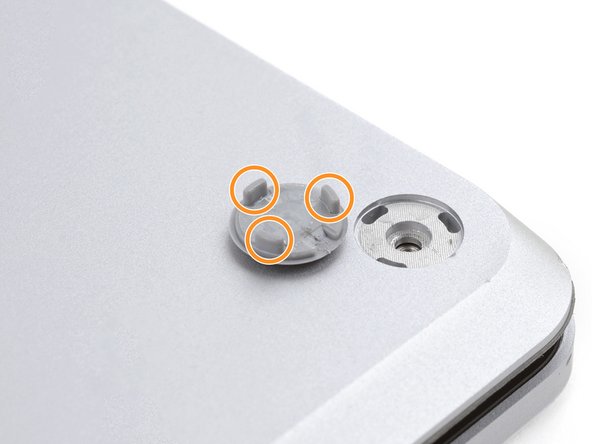
      • This laptop has two different types of feet. During reassembly, make sure the feet go in their correct recesses.

      • The rear feet have a single center clip.

      • The front feet have three clips and can only be reinserted one way.

      • Press the feet into their recesses to secure them to the frame.

      • If the existing feet no longer adhere to the frame, remove the old adhesive and apply a small amount of Tesa Tape where the old adhesive was.

      Ask FixBot

      Add Comment

    5. Microsoft Surface Laptop 4 (15-inch) Feet Replacement: step 5, image 1 of 3 Microsoft Surface Laptop 4 (15-inch) Feet Replacement: step 5, image 2 of 3 Microsoft Surface Laptop 4 (15-inch) Feet Replacement: step 5, image 3 of 3
      • If the feet are damaged or worn out, use 8 mm rubber furniture pads:

      • Peel a pad away from its backing.

      • Align the pad over a foot cavity and press down to secure it.

      Ask FixBot

      Add Comment

Conclusion

To reassemble your device, follow these instructions in reverse order.

Cancel: I did not complete this guide.

3 other people completed this guide.

Spencer Day

Member since: 09/14/22

202,102 Reputation

1,244 Guides authored

Team

iFixit Member of iFixit

Staff

122 Members

86,241 Guides authored

0 Guide Comments

Add Comment

View Statistics:

Past 24 Hours: 5

Past 7 Days: 22

Past 30 Days: 78

All Time: 4,694