Introduction
This guide is used to explain how to replace the rear camera on the Microsoft Surface Book 2 15. It uses the motherboard replacement guide as a prerequisite guide, which is a difficult task to perform.
The rear camera replacement itself is a fairly simple one, that just requires detaching a ribbon cable and reattaching it. However, the steps before it where you open the laptop can difficult.
A majority of the issues that are found with the Microsoft Surface Book 2 15 can be solved through software solutions. Therefore make sure to review troubleshooting page and trying the solutions listed their before making any repairs to the device.
What you need
-
-
-
Open the laptop, then orient it so the touchpad is on your left.
-
Starting at the hinge, count six holes up on the tablet portion of the laptop.
 Ask FixBot
-
-
-
Take a paper clip and unfold it.
-
Place the paper clip in the sixth hole and push until you hear a click.
-
Once you hear the click, lift up on the right side of the tablet from the base until it separates.
-
After the right side has been detached, lift up the left side as well.
-
-
-
Place the tablet on a flat surface.
-
Using a heat gun or iOpener, heat up the edges of the screen to soften up the adhesive.
-
-
-
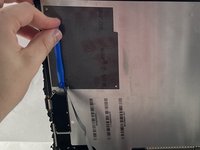
Using a plastic pick, slice underneath the edge of the screen.
-
Slowly make your way around the screen, and carefully cut the adhesive that secures the screen to the frame.
-
-
-
-
Lift up the screen.
-
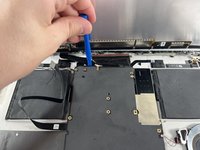
Detach the ribbon cables connecting the underside of the screen to the motherboard.
-
-
-
Use a T3 Torx screwdriver to remove eleven 4 mm screws from the motherboard.
-
Use a T3 Torx screwdriver to remove the ten 2.5 mm screws from the top bar.
-
-
-
Once the screws are removed from the top bar, gently lift up and remove it.
-
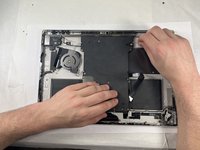
Gently lift up on the motherboard to remove it.
-
-
-
-
-
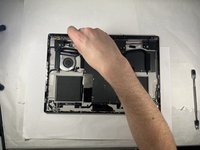
After lifting the motherboard, locate the two cameras near the center of the motherboard.
-
Unplug front camera (right side) from the motherboard (lift carefully).
-
-
-
-
-
In the top left-hand corner of the tablet is where the camera sits.
-
Unscrew the T3 torx screw.
-
-






To reassemble your device, follow these instructions in reverse order.
Cancel: I did not complete this guide.
One other person completed this guide.

Team

UMass Dartmouth, Team 3-3, Petersen Spring 2023 Member of UMass Dartmouth, Team 3-3, Petersen Spring 2023
UMASSD-PETERSEN-S23S3G3
4 Members
72 Guides authored
