Free Shipping on Domestic Orders $75+

MicroSD Card Reader Disconnection

Prerequisite Only
This is a prerequisite-only guide! This guide is part of another procedure and isn’t meant to be used alone.
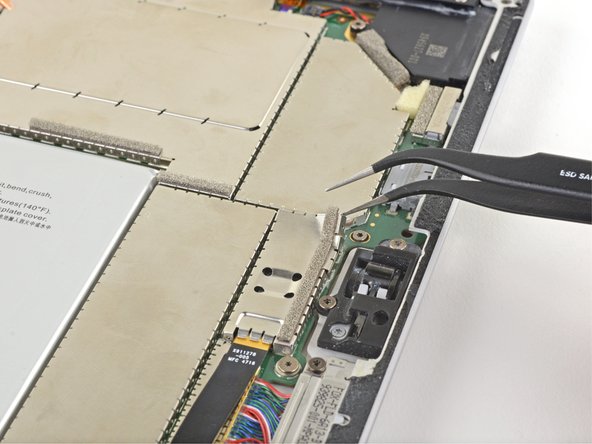
    1. MicroSD Card Reader Disconnection, Remove the EMI shield: step 1, image 1 of 3 MicroSD Card Reader Disconnection, Remove the EMI shield: step 1, image 2 of 3 MicroSD Card Reader Disconnection, Remove the EMI shield: step 1, image 3 of 3
      Tool used on this step:
      Tweezers
      $4.99
      Buy
      • Insert one point of a pair of tweezers into a gap in the edge of the EMI shield covering the microSD card reader cable and connector.

      • Use the tweezers to pry the EMI shield away from the motherboard as much as you can without bending it.

      • Try not to deform the shield too much—you will need to reinstall it during reassembly.

      • Remove the shield.

      Ask FixBot

      Add Comment

    2. MicroSD Card Reader Disconnection, Disconnect the microSD card reader: step 2, image 1 of 2 MicroSD Card Reader Disconnection, Disconnect the microSD card reader: step 2, image 2 of 2
      • Use the flat end of your spudger to lift the microSD card reader's connector straight up out of its socket.

      Ask FixBot

      Add Comment

Conclusion

To reassemble your device, follow these instructions in reverse order.

Cancel: I did not complete this guide.

Sam Omiotek

Member since: 02/25/19

100,863 Reputation

289 Guides authored

0 Guide Comments

Add Comment

View Statistics:

Past 24 Hours: 0

Past 7 Days: 2

Past 30 Days: 12

All Time: 176