
Meizu MX3 Screen Replacement

Feyris and
Last updated on May 22, 2019
Views: 4.3K
View statistics:
- Past 24 Hours:
- 2
- Past 7 Days:
- 25
- Past 30 Days:
- 113
- All Time:
- 4,328
Comments: 0
No one has left comments on this guide. Will you be first?
Go to guide commentsCompleted: 5 6
5 people have marked this guide "completed." Will you be next?
6 people have marked this guide "completed." Including you — great job!
Favorites: 2 3
2 people have favorited (and subscribed to) this guide. Will you be next?
3 people have favorited (and subscribed to) this guide — including you!
Action Shots
Be an action hero! This guide needs images that better demonstrate how to perform specific actions.
Missing Steps
Oops! This guide is currently missing one or more important steps.
Community-Contributed Guide
An awesome member of our community made this guide. It was not created by iFixit staff.
What you need
Tools

Introduction
Go to step 1 ↓Screen replacement (without frame)
-
-
-
Remove the back panel, and unscrew everything to remove the second back panel. Some screw are longer than other. But I mixed them without issue. Here I saw the solution for the network issue: the little contacts between motherboard and screen were bended.
-
I removed the battery, but I think it's not mandatory. If you do, be careful, it's very well glued, and there is some wires behind.
 Ask FixBot
-
-
-
Unplug all the connectors to the motherboard, included the two antennas The small flat ribbon in the corner is a little tricky, you have to switch the black part of the connector, not the white one like some other similar I saw before.
-
-
-
-
Remove the jack connector, removes the lasts screws (mark the placement for later)
-
Remove the motherboard, starting by the upper part: There is a last connector to unplug at the bottom, behind.
-
-
-
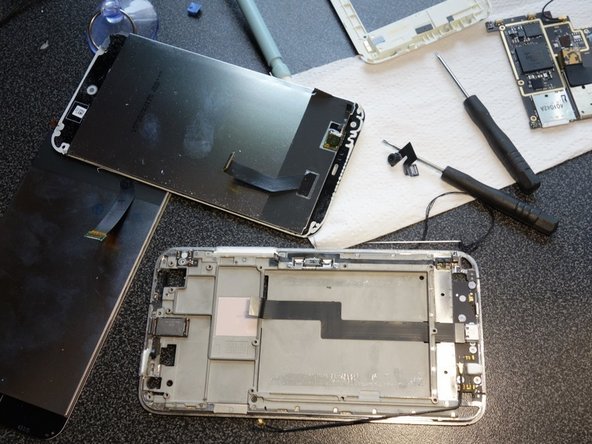
Now, remove the old screen. It's glued, try to lift a corner, then with a plastic tool, unglue everything.
-
Clean the glue inside the metal part.
-
-
-
Put some adhesive (or some glue?) I used thin double-sided tape I had cut the right shape. the side of the screen are less than 1mm wide, it's hard to do here...
-
-



To reassemble your device, follow these instructions in reverse order.
Cancel: I did not complete this guide.
5 other people completed this guide.

