Free Shipping on Domestic Orders $75+

Marshall Woburn Tweeter Replacement

What you need

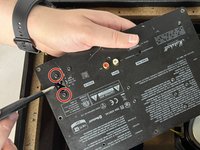
    1. Marshall Woburn Tweeter Replacement, Back Panel: step 1, image 1 of 2 Marshall Woburn Tweeter Replacement, Back Panel: step 1, image 2 of 2
      • Before starting, unplug the speaker from any power source. After unplugging the device, wait around 10 minutes before starting to let the capacitor fully discharge.

      • On a flat surface, orient the device so that the front grille is facing downward.

      • Using a Phillips #1 screwdriver, remove the ten outer 28.6 mm screws marked in red.

      • Remove the eight inner 28.6 mm screws with the Phillips #1 screwdriver.

      Ask FixBot

      Add Comment

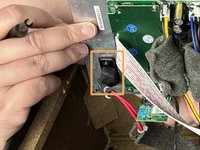
    2. Marshall Woburn Tweeter Replacement: step 2, image 1 of 2 Marshall Woburn Tweeter Replacement: step 2, image 2 of 2
      • Lift the back input board slightly above the back panel.

      • Rotate the input board so that you can slide it into the hole in the back panel that it came from.

      • Fully slide the input board through the back panel and set it down gently inside the speaker.

      Ask FixBot

      Add Comment

    3. Marshall Woburn Tweeter Replacement: step 3, image 1 of 1
      • Grab the panel by the large hole and lift one side until you can fit your hand under.

      • Use your hand to fully remove the back panel from the rest of the frame.

      Ask FixBot

      Add Comment

    1. Marshall Woburn Tweeter Replacement, I/O Board: step 4, image 1 of 1
      • Disconnect the 5 wires circled in red from the back input board.

      • Grip and pull the connectors, not the wires.

      • There may be a little resistance when pulling on the connectors, but it should not require excessive force.

      Ask FixBot

      Add Comment

    2. Marshall Woburn Tweeter Replacement: step 5, image 1 of 2 Marshall Woburn Tweeter Replacement: step 5, image 2 of 2
      • Remove the two 12.7 mm screws marked in red from the front of the back input panel with a Phillips #1 screwdriver.

      • Remove the power input from the back side of the panel.

      Ask FixBot

      Add Comment

    3. Marshall Woburn Tweeter Replacement: step 6, image 1 of 1
      • Completely remove the I/O board and the attached plate.

      Ask FixBot

      Add Comment

    1. Marshall Woburn Tweeter Replacement, Tweeter: step 7, image 1 of 1
      • Using a Phillips #1 screwdriver, remove the eight 15.8 mm screws attaching the tweeters to the frame.

      • Disconnect the two wires from the back of each tweeter.

      Ask FixBot

      Add Comment

    2. Marshall Woburn Tweeter Replacement: step 8, image 1 of 1
      • Lift the tweeter from the frame to remove it.

      Ask FixBot

      Add Comment

Conclusion

To reassemble your device, follow these instructions in reverse order.

Cancel: I did not complete this guide.

Kenneth

Member since: 10/29/23

174 Reputation

2 Guides authored

Team

UMass Dartmouth, Team 2-4, Gulbrandsen Fall 2023 Member of UMass Dartmouth, Team 2-4, Gulbrandsen Fall 2023

UMASSD-GULBRANDSEN-F23S2G4

3 Members

18 Guides authored

1 Guide Comment

Any ideas to which new tweeters to buy?

Lars - Reply Share

Add Comment

View Statistics:

Past 24 Hours: 1

Past 7 Days: 6

Past 30 Days: 32

All Time: 1,010