Introduction
This guide will show you the necessary steps to replace the forward/reverse switch. It shows how to remove the battery and the outer casing, in order to locate the forward/reverse switch on the drill.
What you need
-
-
-
Hold the drill upright.
-
Place your finger on the white battery-release button.
 Ask FixBot
-
-
-
Slide the battery forward while pressing down on the white battery-release button.
-
-
-
-
-
-
Hold the drill upright with the back panel facing you.
-
Unscrew the two 18 mm screws from the back panel using a Phillips PH2 screwdriver.
-
-
-
Apply slight pressure to the sides of the backplate and pull away from the drill.
-
-
-
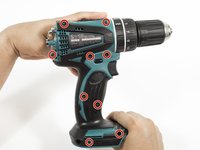
Unscrew the nine 18 mm screws from the outer casing using a Phillips PH2 screwdriver.
-
-
-
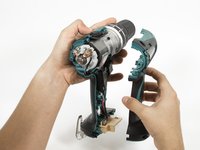
Apply slight pressure to the sides of the outer casing and pull away from the drill.
-
-
-
-
-
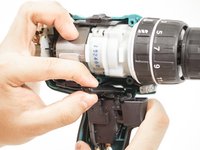
Grab onto the forward/reverse switch.
-
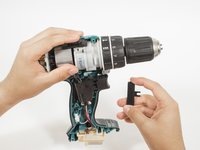
Gently pull the forward/reverse switch to separate it from the trigger assembly.
-








To reassemble your device, follow these instructions in reverse order.
Cancel: I did not complete this guide.
4 other people completed this guide.

Team

Cal Poly, Team 15-4, Livingston Fall 2016 Member of Cal Poly, Team 15-4, Livingston Fall 2016
CPSU-LIVINGSTON-F16S15G4
4 Members
84 Guides authored
