
Magimix Vision Toaster - heating element replacement

PierreGlg and one other contributor
Last updated on Oct 13, 2026
Views: 365
View statistics:
- Past 24 Hours:
- 11
- Past 7 Days:
- 68
- Past 30 Days:
- 205
- All Time:
- 365
Comments: 0
No one has left comments on this guide. Will you be first?
Go to guide commentsCompleted: 0 1
No one has marked this guide "completed." Will you be the first?
1 person has marked this guide "completed." It's you — great job!
Favorites: 0 1
No one has favorited (and subscribed to) this guide. Will you be the first?
1 person has favorited (and subscribed to) this guide — and that's you!
Community-Contributed Guide
An awesome member of our community made this guide. It was not created by iFixit staff.
Needs More Images
A few more images would make this guide's procedures crystal clear.
Missing Details
Some of this guide's details are missing. Help users by adding tools, difficulty, or time.
Introduction
Go to step 1 ↓Please note that the heating elements are different between the upper and lower positions. Ensure you obtain the correct heating element.
The upper heating elements (part#505422) are marked 'U' on their base. The lower heating elements (part#505423) are marked 'L'.
Do not be tempted to disassemble the new heating element. It should only be used as a complete replacement part.
-
-
-
Remove the crumb tray first
-
Removal of the bottom screws:
-
Turn the device over
-
Remove the 3 Phillips screws under each of the two end panels
 Ask FixBot
-
-
-
Removal of the top screws:
-
Unlock and open the side glass panels
-
Remove the four star-shaped Torx screws (at the top of the recesses for the glass panels)
-
The end panel is now unlocked and can be removed by sliding it upward. The knob on the end of the toaster is attached to a metal arm. Remove the knob and arm together by lowering the black plastic retaining-hook underneath the arm.
-
-
-
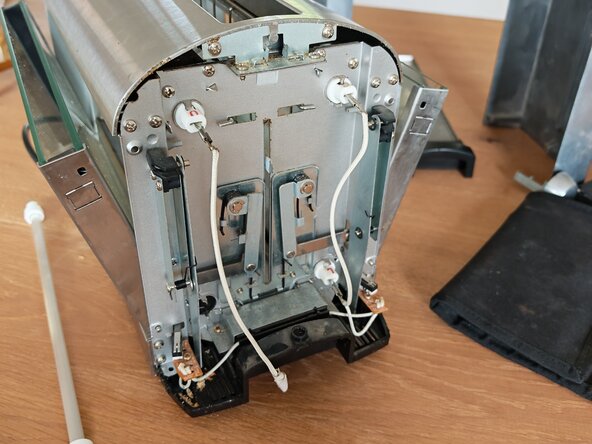
The ends of the four heating elements are visible on each side.
-
Unplug the spade terminals on both ends of the Heating Element that you want to replace. At the 'knob' end, bend the flat spade part of the element horizontal so that it can slide through the toaster.
-
The heating element is held in place on the frame by tabs. At the non-knob end, carefully bend open the 2 tabs which hold the heating element in place. Slide out the old heating element (towards the non-knob end of the toaster)
-
If the heating element is broken inside the device, remove all the pieces.
-
-
-
Insert the new heating element by sliding it into its slot from the non-knob end. Ensure that the new heating element is in the correct orientation (with the flat parts of the plastic ends at top and bottom)
-
Carefully bend the retaining tabs at the non-knob end back into their original position.
-
Securely reconnect the spade terminals at both ends.
-
-
-
-
Reinstall the end panels by positioning them slightly above their proper position then sliding them downwards. While the end panel is still loose, slot the metal arm of the toaster knob through the panel then click the arm back into its black plastic receptacle.
-
Reinstall the four upper Torx screws.
-
Reinstall the six lower Philips screws.
-
-




To reassemble your device, follow the instructions in reverse order.
Special thanks to these translators:
100%

Mike C is helping us fix the world! Want to contribute?
Start translating ›

