
Asus ROG G74SX-DH73-3D Random Access Memory Replacement

Jackson Reynolds and 3 other contributors
Last updated on Aug 2, 2019
Views: 767
View statistics:
- Past 24 Hours:
- 1
- Past 7 Days:
- 6
- Past 30 Days:
- 39
- All Time:
- 767
Comments: 0
No one has left comments on this guide. Will you be first?
Go to guide commentsCompleted: 0 1
No one has marked this guide "completed." Will you be the first?
1 person has marked this guide "completed." It's you — great job!
Favorites: 0 1
No one has favorited (and subscribed to) this guide. Will you be the first?
1 person has favorited (and subscribed to) this guide — and that's you!
Introduction
Go to step 1 ↓If you need to reinstall new RAM slots, you can access the RAM using this guide. You may need to replace RAM if your computer is not running fast enough or has insufficient memory. For this guide, you will need a plastic opening tool and a flathead screwdriver. You will not need to do any difficult steps, but pry the RAM clips carefully.
What you need
Tools


-
-
-
Place the device upside down.
-
Unscrew the big metal screw with a flathead screwdriver.
-
Remove the cover using the plastic opening tool.
 Ask FixBot
-
-
-


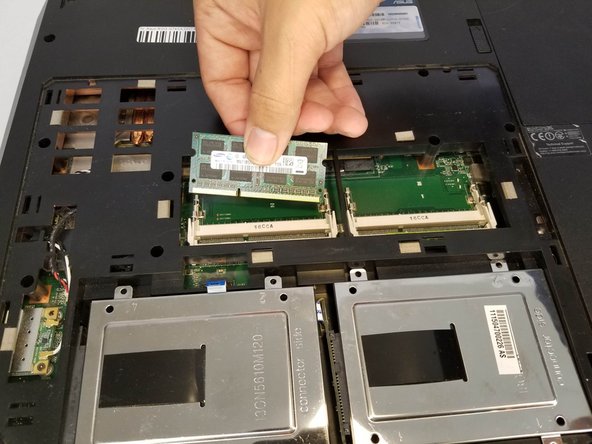
To reassemble your device, follow these instructions in reverse order.

Team

University of North Texas, Team S3-G7, Raign Fall 2018 Member of University of North Texas, Team S3-G7, Raign Fall 2018
UNT-RAIGN-F18S3G7
3 Members
48 Guides authored
