
iMac Intel 21.5" EMC 2308 Dual drives. Replace DVD with SSD with fast SATA connector

Dmitry Baskin and 3 other contributors
Last updated on Aug 2, 2024
Views: 4.3K
View statistics:
- Past 24 Hours:
- 8
- Past 7 Days:
- 31
- Past 30 Days:
- 123
- All Time:
- 4,261
Comments: 3
3 guide comments.
Go to guide commentsCompleted: 2 3
2 people have marked this guide "completed." Will you be next?
3 people have marked this guide "completed." Including you — great job!
Favorites: 3 4
3 people have favorited (and subscribed to) this guide. Will you be next?
4 people have favorited (and subscribed to) this guide — including you!
Community-Contributed Guide
An awesome member of our community made this guide. It was not created by iFixit staff.
Introduction
Go to step 1 ↓Complete steps from this guide Installing iMac Intel 21.5" EMC 2308 Dual Drive
with exceptions provided below
What you need
Tools
-
Spudger4.9
-


-
-
-
Task : 1) replace DVD drive with SSD, 2) leave original 3,5 HDD (or replace it with another 3,5 with more capacity), 3) make SSD bootable 4) use SSD at its full potential (limited by SATA II bus) speed. Referred guide - Installing iMac Intel 21.5" EMC 2308 Dual Drive
 Ask FixBot
-
-
-
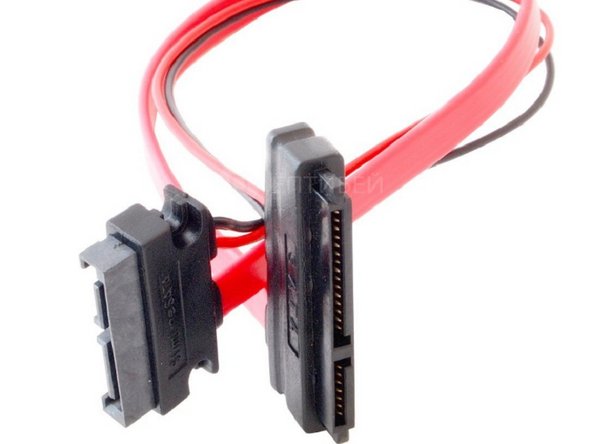
you don't really need optical bay enclosure. I went with this cable which works the same, plus allows for a little trick below, but impossible with enclosure. https://youroptibay.ru/accessories/cable...
-
-
-
My SSD is taped to inner part of imac's body so it does not wobble inside. -Also make sure that you stick temp sensor from optical drive to smth cool inside (in my setup its cable is not long enough to reach ssd, which was placed all the way to 3,5 HDD - see below), DVD fan speed will depend on sensor's correct placement.
-
-
-
-NB: Don’t try to remove other end of sensor cable from its socket in the board - it will make your DVD fan run at full speed!
-
-
-
if you connect your SSD (bootable) with data cable from DVD drive (like it is suggested in the referred guide) it will drop SSD' R/W speed nearly twice (tested on emc 2308), apparently because DVD bus is slower than main HDD sata II.
-
-
-
However, voltage from DVD connector is only enough to power a 2,5 drive (SSD) but not enough to power your 3,5 HDD in its place.
-
-
-
Since that mini sata-sata cable is sufficiently long, you need to cut cable's SATA connector (I used a cardboard knife) in two parts right where there is plastic bridge between two groups of connectors. Power is in wider (15pin) part and you can easily cut it right in the middle of plastic bridge. [Maybe better cables can be found on market, so no need to cut it]
-
-
-
Note: my final setup is not shown in the picture. Here before minisata-sata cable was split and re-routed
-
-
-
Connect your released 15pin part of your minisata-sata cable to SSD and connect 7pin SATA data cable from your 3,5 HDD to SSD.
-
-
-
-
Leave your 3,5 HDD connected to 15pin SATA original power connector. Connect 7pin data cable from the split minisata-sata cable to your 3,5 HDD.
-
-
-
In this setup power from DVD goes to SSD and power from original SATA 3,5 HDD powers HDD. Where fast data cable from 3,5 HDD connects to your SSD, and slow data cable from DVD goes to 3,5 HDD.
-
-
-
Be careful with tiny Vsync cable (Step 5 in the referred guide) the first one you detach when disconnecting display panel). In my case I bended it too hard and my display's backlight was gone. So I had to cut off the damaged part and strip cable's end with a blade;
-
-
-
and this wasn’t much fun because four metal contacts in the cable are just so tiny and thin, but it worked eventually.
-
-



To reassemble your device, follow these instructions in reverse order.
Cancel: I did not complete this guide.
2 other people completed this guide.

3 Guide Comments
Have you tried to connect them other way? Dvd to ssd, hdd to hdd?
