Free Shipping on Domestic Orders $75+

Acer Chromebook CP5-471-C0EX Trackpad Replacement

Views: 418

View statistics:

Past 24 Hours:
1
Past 7 Days:
10
Past 30 Days:
58
All Time:
418
Comments: 0

No one has left comments on this guide. Will you be first?

Go to guide comments
Completed: 1

1 person has marked this guide "completed." Will you be next?

Favorites: 0

No one has favorited (and subscribed to) this guide. Will you be the first?

Time Required: 15 - 20 minutes
Difficulty: Moderate
Acer Chromebook CP5-471-C0EX Trackpad Replacement

Introduction

Go to step 1 ↓

This guide will show you how to replace the trackpad (or touchpad) on your Acer Chromebook CP5-471-C0EX laptop. If your touchpad isn't working, it may be a result of a missing or out-of-date driver or a build-up of dirt and dust over time. The replacement of the trackpad may solve issues with unresponsiveness.

Make sure to power down your device and disconnect from any power sources before you begin.

What you need

Tools

    1. Acer Chromebook CP5-471-C0EX Trackpad Replacement, Back Cover: step 1, image 1 of 2 Acer Chromebook CP5-471-C0EX Trackpad Replacement, Back Cover: step 1, image 2 of 2
      • Turn off the laptop before starting.

      • Flip the laptop over so the model stickers face the ceiling.

      Ask FixBot

      Add Comment

    2. Acer Chromebook CP5-471-C0EX Trackpad Replacement: step 2, image 1 of 3 Acer Chromebook CP5-471-C0EX Trackpad Replacement: step 2, image 2 of 3 Acer Chromebook CP5-471-C0EX Trackpad Replacement: step 2, image 3 of 3
      • Remove twelve 7 mm screws from the back of the laptop using a Phillips #1 screwdriver.

      Ask FixBot

      Add Comment

    3. Acer Chromebook CP5-471-C0EX Trackpad Replacement: step 3, image 1 of 2 Acer Chromebook CP5-471-C0EX Trackpad Replacement: step 3, image 2 of 2
      • Use a Jimmy to pry apart the bottom of the case from the laptop.

      • Be careful not to warp or crack the case.

      Ask FixBot

      Add Comment

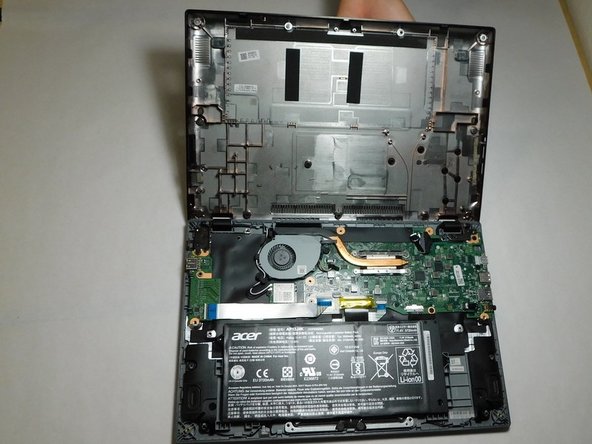
    1. Acer Chromebook CP5-471-C0EX Trackpad Replacement, Battery: step 4, image 1 of 2 Acer Chromebook CP5-471-C0EX Trackpad Replacement, Battery: step 4, image 2 of 2
      • Carefully detach the ribbon cable connecting the battery and the motherboard.

      Ask FixBot

      Add Comment

    2. Acer Chromebook CP5-471-C0EX Trackpad Replacement: step 5, image 1 of 1
      • Use your hands to lift the battery out of the device.

      Ask FixBot

      Add Comment

    1. Acer Chromebook CP5-471-C0EX Trackpad Replacement, Trackpad: step 6, image 1 of 3 Acer Chromebook CP5-471-C0EX Trackpad Replacement, Trackpad: step 6, image 2 of 3 Acer Chromebook CP5-471-C0EX Trackpad Replacement, Trackpad: step 6, image 3 of 3
      • Disconnect the wide black ribbon cable from the motherboard using an iFixit opening tool.

      • Disconnect the blue-tipped ribbon from the motherboard.

      • Be careful not to damage the motherboard while removing the ribbon cables.

      Ask FixBot

      Add Comment

    2. Acer Chromebook CP5-471-C0EX Trackpad Replacement: step 7, image 1 of 3 Acer Chromebook CP5-471-C0EX Trackpad Replacement: step 7, image 2 of 3 Acer Chromebook CP5-471-C0EX Trackpad Replacement: step 7, image 3 of 3
      • Remove the golden tape connecting the trackpad to the plastic divider using an iFixit opening tool.

      • Peel back the black plastic divider that separates the motherboard and trackpad.

      Ask FixBot

      Add Comment

    3. Acer Chromebook CP5-471-C0EX Trackpad Replacement: step 8, image 1 of 2 Acer Chromebook CP5-471-C0EX Trackpad Replacement: step 8, image 2 of 2
      • Remove four 3 mm screws from the trackpad using a Phillips #1 screwdriver.

      Ask FixBot

      Add Comment

    4. Acer Chromebook CP5-471-C0EX Trackpad Replacement: step 9, image 1 of 2 Acer Chromebook CP5-471-C0EX Trackpad Replacement: step 9, image 2 of 2
      • Carefully remove the trackpad from the device.

      Ask FixBot

      Add Comment

Conclusion

To reassemble your device, follow these instructions in reverse order.

Cancel: I did not complete this guide.

One other person completed this guide.

Trestin Bachtiger

Member since: 02/08/22

239 Reputation

1 Guide authored

Team

Gateway, Team 1-1, Saknee Spring 2022 Member of Gateway, Team 1-1, Saknee Spring 2022

GCC-SAKNEE-S22S1G1

4 Members

60 Guides authored

0 Guide Comments

Add Comment

View Statistics:

Past 24 Hours: 1

Past 7 Days: 10

Past 30 Days: 58

All Time: 418