Free Shipping on Domestic Orders $75+

MacBook Pro 15" Unibody Late 2011 AirPort/Bluetooth Board Replacement

What you need

    1. MacBook Pro 15" Unibody Late 2011 AirPort/Bluetooth Board Replacement, Lower Case: step 1, image 1 of 1
      • Remove the following ten screws securing the lower case to the upper case:

      • Three 13.5 mm (14.1 mm) Phillips screws.

      • Seven 3 mm Phillips screws.

      • When removing these screws, note how they come out at a slight angle. They must be reinstalled the same way.

      Ask FixBot

      Add Comment

    2. MacBook Pro 15" Unibody Late 2011 AirPort/Bluetooth Board Replacement: step 2, image 1 of 1
      • Using both hands, lift the lower case near the vent to pop it off two clips securing it to the upper case.

      • Remove the lower case and set it aside.

      Ask FixBot

      Add Comment

    1. MacBook Pro 15" Unibody Late 2011 AirPort/Bluetooth Board Replacement, Battery Connector: step 3, image 1 of 2 MacBook Pro 15" Unibody Late 2011 AirPort/Bluetooth Board Replacement, Battery Connector: step 3, image 2 of 2
      • For certain repairs (e.g. hard drive), disconnecting the battery connector is not necessary but is recommended as it prevents any accidental shorting of electronics on the motherboard. If you do not disconnect the battery connector, please be careful as parts of the motherboard might be electrified.

      • Use the edge of a spudger to pry the battery connector upwards from its socket on the logic board.

      • It is useful to pry upward on both short sides of the connector to "walk" it out of its socket.

      Ask FixBot

      Add Comment

    2. MacBook Pro 15" Unibody Late 2011 AirPort/Bluetooth Board Replacement: step 4, image 1 of 1
      • Bend the battery cable slightly away from its socket on the logic board so it does not accidentally connect itself while you work.

      Ask FixBot

      Add Comment

    1. MacBook Pro 15" Unibody Late 2011 AirPort/Bluetooth Board Replacement, AirPort/Bluetooth Board Assembly: step 5, image 1 of 1
      • Pull the camera cable connector straight out of its socket on the logic board.

      • Pull the cable parallel to the face of the logic board toward the optical drive opening.

      Ask FixBot

      Add Comment

    2. MacBook Pro 15" Unibody Late 2011 AirPort/Bluetooth Board Replacement: step 6, image 1 of 1
      • Use the flat end of a spudger to carefully pry the AirPort/Bluetooth ribbon cable up off its socket on the logic board.

      Ask FixBot

      Add Comment

    3. MacBook Pro 15" Unibody Late 2011 AirPort/Bluetooth Board Replacement: step 7, image 1 of 2 MacBook Pro 15" Unibody Late 2011 AirPort/Bluetooth Board Replacement: step 7, image 2 of 2
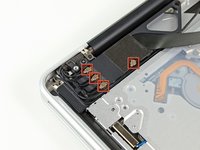
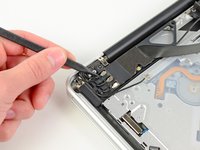
      • Use the tip of a spudger to pry the four antenna connectors up from their sockets on the AirPort/Bluetooth board.

      Ask FixBot

      Add Comment

    4. MacBook Pro 15" Unibody Late 2011 AirPort/Bluetooth Board Replacement: step 8, image 1 of 3 MacBook Pro 15" Unibody Late 2011 AirPort/Bluetooth Board Replacement: step 8, image 2 of 3 MacBook Pro 15" Unibody Late 2011 AirPort/Bluetooth Board Replacement: step 8, image 3 of 3
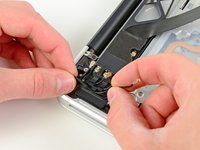
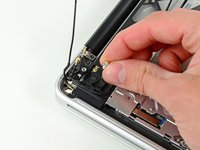
      • De-route all four antenna cables from their channels in the AirPort/Bluetooth housing.

      • De-route the camera cable from its channel in the AirPort/Bluetooth housing.

      Ask FixBot

      Add Comment

    5. MacBook Pro 15" Unibody Late 2011 AirPort/Bluetooth Board Replacement: step 9, image 1 of 1
      • Remove the following two screws securing the AirPort/Bluetooth assembly to the upper case:

      • One 8.6 mm Phillips screw

      • One 3.9 mm Phillips screw

      Ask FixBot

      Add Comment

    6. MacBook Pro 15" Unibody Late 2011 AirPort/Bluetooth Board Replacement: step 10, image 1 of 1
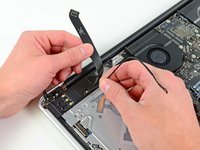
      • Remove the AirPort/Bluetooth assembly from the upper case, minding any cables that may get caught.

      Ask FixBot

      Add Comment

    1. MacBook Pro 15" Unibody Late 2011 AirPort/Bluetooth Board Replacement, AirPort/Bluetooth Board: step 11, image 1 of 2 MacBook Pro 15" Unibody Late 2011 AirPort/Bluetooth Board Replacement, AirPort/Bluetooth Board: step 11, image 2 of 2
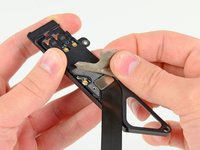
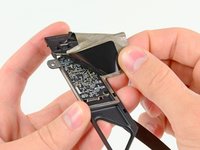
      • Peel and remove the piece of EMI tape wrapped around the AirPort/Bluetooth assembly.

      Ask FixBot

      Add Comment

    2. MacBook Pro 15" Unibody Late 2011 AirPort/Bluetooth Board Replacement: step 12, image 1 of 2 MacBook Pro 15" Unibody Late 2011 AirPort/Bluetooth Board Replacement: step 12, image 2 of 2
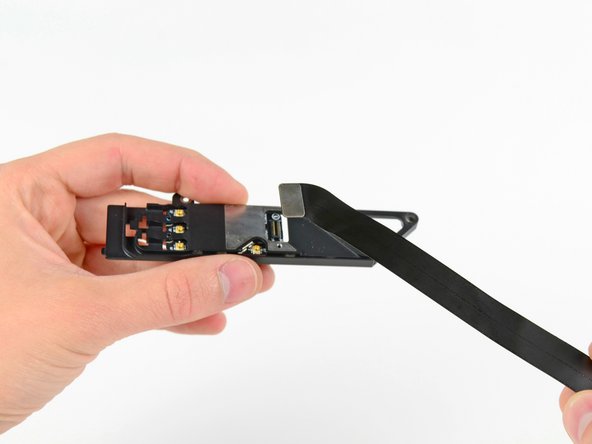
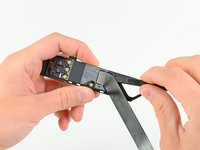
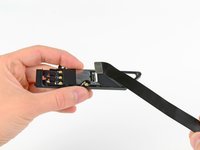
      • Use the flat end of a spudger to pry the AirPort/Bluetooth cable away from its socket on the AirPort/Bluetooth board.

      • Remove the AirPort/Bluetooth cable from the AirPort/Bluetooth assembly.

      Ask FixBot

      Add Comment

    3. MacBook Pro 15" Unibody Late 2011 AirPort/Bluetooth Board Replacement: step 13, image 1 of 2 MacBook Pro 15" Unibody Late 2011 AirPort/Bluetooth Board Replacement: step 13, image 2 of 2
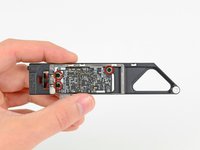
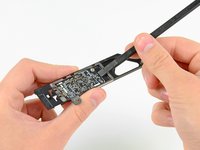
      • Remove the three Phillips screws securing the AirPort/Bluetooth board to the AirPort/Bluetooth board housing.

      • Use the flat end of a spudger to dislodge the AirPort/Bluetooth board from its recess in the AirPort/Bluetooth board housing.

      Ask FixBot

      Add Comment

    4. MacBook Pro 15" Unibody Late 2011 AirPort/Bluetooth Board Replacement: step 14, image 1 of 1
      • Remove the AirPort/Bluetooth board from its aluminum housing.

      Ask FixBot

      Add Comment

    5. MacBook Pro 15" Unibody Late 2011 AirPort/Bluetooth Board Replacement: step 15, image 1 of 1
      • Before securing the AirPort/Bluetooth bracket to the upper case, be sure the small tab on its left edge is inserted into the small void cut into the black plastic optical drive opening.

      Ask FixBot

      Add Comment

Conclusion

To reassemble your device, follow these instructions in reverse order.

Cancel: I did not complete this guide.

32 other people completed this guide.

6 Guide Comments

I'm interested to replace the Airpot/Bluetooth Board on my MPB Late 2011 (MacbookPro 8,2) that currently has the board BCM 2070B0. I need to be sure that the replacement board at this link (http://www.ebay.com/itm/Macbook-Pro-A127...) will fit with my MBP.

The next question is related to the replacement of the aluminium frame as well as mentioned at the beginning of this article or is the current one is ok as well. I have available the images of the HW data of my MBP if need to properly answer the questions.

Many thanks for your great help.

Best regards

Paolo

paolobetti - Reply Share

Used this to replace my late 2011 Airport/Bluetooth board with a slightly later one that fits the same and enabled Bluetooth 4.0. BCM94331PCIEBT4AX => BCM94331PCIEBT4ACX.

James Wang - Reply Share

Do you mind if I ask which Bluetooth board you updated to and where you bought it?

Colin - Reply Share

Question : If I upgrade my late 2011 MBP to BT4.0 running H Sierra 10.13.4 will I have full functionality with handoff, continuity etc…I have read that many people are having issues

Matt - Reply Share

hello i have a MacBookPro 6.2. Midle 2010

i’m also interested to replace the Airpot/Bluetooth Board for a higher Version. ?!

is there a option, an with witch Card.

okieh esuark - Reply Share

Add Comment

View Statistics:

Past 24 Hours: 3

Past 7 Days: 50

Past 30 Days: 92

All Time: 28,442