Introduction
Prerequisite only guide to remove the USB ports in a MacBook Neo.
What you need
-
-
-
Use a Torx Plus 3IP driver to remove the two 1.7 mm‑long screws securing the USB ports connector cover.
 Ask FixBot
-
-
-
-
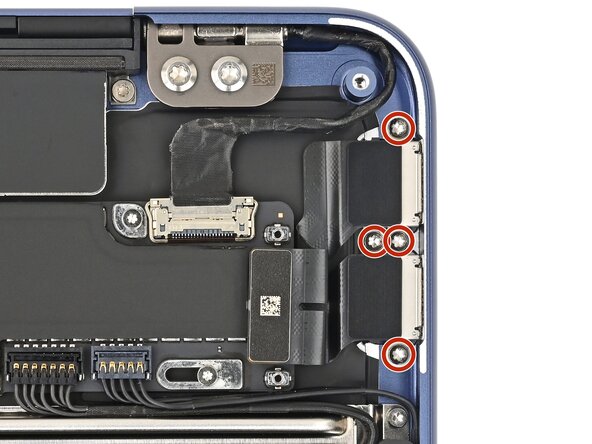
Use a Torx Plus 5IP driver to remove the four 2.8 mm‑long screws securing the USB ports.
-
-
-
Use a Torx Plus 5IP driver to partially install the four 2.8 mm‑long screws securing them.
-
Plug both ends of a USB‑C to USB‑C cable into the ports. If either port feels stiff, shift the port and reconnect the cable until it feels smooth.
-
Fully tighten the screws securing the USB ports, and disconnect the cable from both.
-
Skip the step above this one.
-
-




Finish Line

