
MacBook Air 13" Mid 2013 Solid-State Drive Replacement

Walter Galan and
Last updated on Jun 1, 2021
Views: 378K
View statistics:
- Past 24 Hours:
- 20
- Past 7 Days:
- 114
- Past 30 Days:
- 510
- All Time:
- 378,172
Comments: 118
87 comments on steps, 31 guide comments.
Go to guide commentsCompleted: 148 149
148 people have marked this guide "completed." Will you be next?
149 people have marked this guide "completed." Including you — great job!
Favorites: 36 37
36 people have favorited (and subscribed to) this guide. Will you be next?
37 people have favorited (and subscribed to) this guide — including you!
Introduction
Go to step 1 ↓Use this guide to upgrade or replace the solid-state drive in a MacBook Air 13” Mid 2013. This MacBook Air uses a proprietary storage drive connector, and is therefore not compatible with common M.2 drives without the use of an adapter.
Before you perform this repair, if at all possible, back up your existing SSD. Then, either familiarize yourself with internet recovery or create a bootable external drive so you’ll be ready to install macOS onto your new drive and migrate your data to the new SSD.
Finally, we strongly recommend installing macOS 10.13 High Sierra (or a later macOS) before replacing the original SSD from your MacBook Air. Most new SSDs require updated storage drivers not found in versions of macOS prior to High Sierra.
What you need
Fix Kit
This kit contains all the parts and tools needed to complete this guide.

Parts

Tools


-
-
Tool used on this step:P5 Pentalobe Screwdriver Retina MacBook Pro and Air$5.99
-
Use a P5 Pentalobe driver to remove ten screws securing the lower case, of the following lengths:
-
Two 9 mm screws
-
Eight 2.6 mm screws
 Ask FixBot
-
-
-
Wedge your fingers between the display and the lower case and pull upward to pop the lower case off the Air.
-
Remove the lower case and set it aside.
-
-
-
-
-
-
Grab the clear plastic pull tab attached to the battery connector and pull it parallel to the board toward the front edge of the Air.
-
-
-
-
-
Remove the single 2.9 mm T5 Torx screw securing the SSD to the logic board.
-
-
-
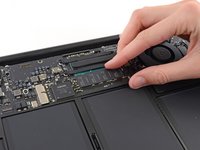
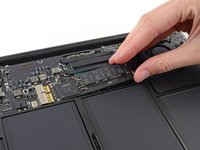
Gently lift the end of the SSD about half an inch and pull it straight out of its socket on the logic board.
-
-


To reassemble your device, follow these instructions in reverse order.
Not sure what to do with your old SSD? Use this external SSD enclosure to turn it into a handy portable external drive!
Cancel: I did not complete this guide.
148 other people completed this guide.

31 Guide Comments
I'm also looking for a 256HB SSD because 128GB isn't enough?
At the moment, the only source for this part is on eBay, at UpgradeMonkey shop (UK)
Link : http://www.ebay.fr/itm/NEW-haswell-MacBo...
It's high priced, but I didn't find anywhere else.
Regards.
http://www.alelua.com/es/31-almacenamien... SDD for MacBook Air 11" and 13" (Mid 2013/Early 2014) 256 GB Drive
