What you need
-
-
-
Remove the two Phillips screws connecting the underside of the hard drive to the internal frame.
 Ask FixBot
-
-
-
Remove the two Phillips screws securing the side of the hard drive to the internal frame.
-
-
-
-
Use the flat end of a spudger to pry the hard drive thermal sensor board off the adhesive securing it to the side of the hard drive.
-
-
-
Remove the strip of tape holding the thermal sensor cable to the hard drive and remove the thermal sensor from the hard drive.
-
-
-
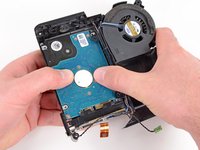
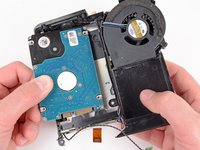
Slide the hard drive toward the speaker to disconnect it from the interconnect board.
-
Lift the hard drive from the edge opposite the fan and remove it from the internal frame.
-
-


To reassemble your device, follow these instructions in reverse order.

1 Guide Comment
For all those poor people who have wrecked their Minis by following the bad advice on this page, I fixed mine by replacing this part:
http://www.powerbookmedic.com/Mac-Mini-I... (Apple part no 922-8807).
I did manage to solder a connector back onto the visible contacts on my original board, but it didn't work; the replacement worked fine.
If your cable is damaged too, you'll need to replace that too, but note that there are several different ones, and SKU17434 (Apple part 922-7319) is NOT compatible with the above board. I don't know the exact model of cable - having received the wrong one I managed to repair my original one.
