Free Shipping on Domestic Orders $75+

This translation was generated by a machine and has not been reviewed by a person yet. Speak this language? Review it.

Mac Studio (2022) Power Supply Replacement

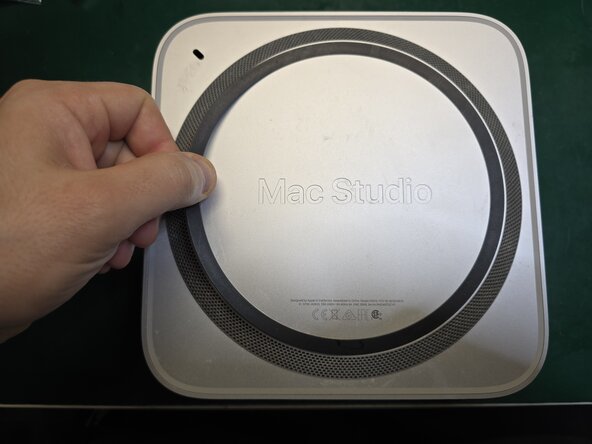
    1. Mac Studio (2022) Power Supply Replacement, Power Supply: step 1, image 1 of 3 Mac Studio (2022) Power Supply Replacement, Power Supply: step 1, image 2 of 3 Mac Studio (2022) Power Supply Replacement, Power Supply: step 1, image 3 of 3
      • Dampen the black circular rubber with a little isopropyl alcohol and insert a feeler gauge underneath it.

      Ask FixBot

      Add Comment

    2. Mac Studio (2022) Power Supply Replacement: step 2, image 1 of 3 Mac Studio (2022) Power Supply Replacement: step 2, image 2 of 3 Mac Studio (2022) Power Supply Replacement: step 2, image 3 of 3
      • Work underneath the entire rubber strip, adding a bit of isopropyl alcohol as you go.

      Ask FixBot

      Add Comment

    3. Mac Studio (2022) Power Supply Replacement: step 3, image 1 of 3 Mac Studio (2022) Power Supply Replacement: step 3, image 2 of 3 Mac Studio (2022) Power Supply Replacement: step 3, image 3 of 3
      • Remove the rubber

      Ask FixBot

      Add Comment

    4. Mac Studio (2022) Power Supply Replacement: step 4, image 1 of 3 Mac Studio (2022) Power Supply Replacement: step 4, image 2 of 3 Mac Studio (2022) Power Supply Replacement: step 4, image 3 of 3
      • Use a T8 screwdriver to remove the 4 cover screws.

      Ask FixBot

      Add Comment

    5. Mac Studio (2022) Power Supply Replacement: step 5, image 1 of 3 Mac Studio (2022) Power Supply Replacement: step 5, image 2 of 3 Mac Studio (2022) Power Supply Replacement: step 5, image 3 of 3
      • Remove the 4 T10 screws

      Ask FixBot

      Add Comment

    6. Mac Studio (2022) Power Supply Replacement: step 6, image 1 of 3 Mac Studio (2022) Power Supply Replacement: step 6, image 2 of 3 Mac Studio (2022) Power Supply Replacement: step 6, image 3 of 3
      • Remove the safety cover of the 2 screws with tweezers

      Ask FixBot

      Add Comment

    7. Mac Studio (2022) Power Supply Replacement: step 7, image 1 of 3 Mac Studio (2022) Power Supply Replacement: step 7, image 2 of 3 Mac Studio (2022) Power Supply Replacement: step 7, image 3 of 3
      • Still using the T10 screwdriver, remove the two 12V screws from the power supply and gently lift it up.

      Ask FixBot

      Add Comment

    8. Mac Studio (2022) Power Supply Replacement: step 8, image 1 of 2 Mac Studio (2022) Power Supply Replacement: step 8, image 2 of 2
      • Remove the power supply by disconnecting the connector shown in the photo on the back.

      • Follow the guide in reverse order to reassemble the new power supply.

      Ask FixBot

      Add Comment

Conclusion

To reassemble your device, follow these instructions in reverse order.

Cancel: I did not complete this guide.

One other person completed this guide.

andreacero

Member since: 01/18/11

668 Reputation

4 Guides authored

0 Guide Comments

Add Comment

View Statistics:

Past 24 Hours: 8

Past 7 Days: 59

Past 30 Days: 166

All Time: 352