Free Shipping on Domestic Orders $75+

Mac Pro Late 2013 Fan Assembly Replacement

Prerequisite Only
This is a prerequisite-only guide! This guide is part of another procedure and isn’t meant to be used alone.

What you need

    1. Mac Pro Late 2013 Fan Assembly Replacement, Fan Assembly: step 1, image 1 of 3 Mac Pro Late 2013 Fan Assembly Replacement, Fan Assembly: step 1, image 2 of 3 Mac Pro Late 2013 Fan Assembly Replacement, Fan Assembly: step 1, image 3 of 3
      • Remove five 5.1 mm T10 Torx screws from around the outer perimeter of the fan assembly.

      Ask FixBot

      Add Comment

    2. Mac Pro Late 2013 Fan Assembly Replacement: step 2, image 1 of 2 Mac Pro Late 2013 Fan Assembly Replacement: step 2, image 2 of 2
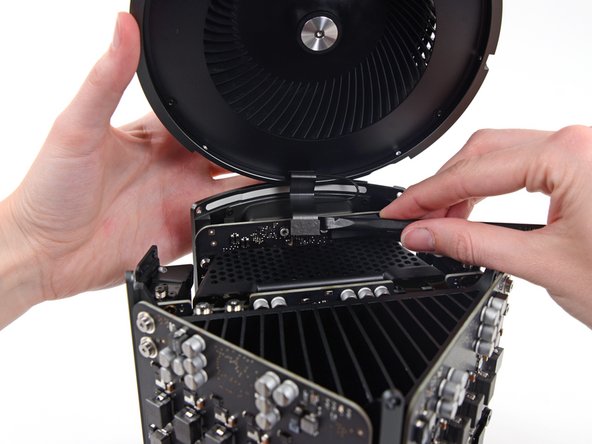
      • The fan assembly is attached to the rest of the computer by two cables on the IO board side.

      • Tilt the assembly up away from the IO board.

      • Do not try to remove the fan assembly yet, as it is still attached by two cables.

      Ask FixBot

      Add Comment

    3. Mac Pro Late 2013 Fan Assembly Replacement: step 3, image 1 of 1
      • While supporting the fan assembly with one hand, loosen the two T8 captive screws in the fan cable bracket.

      • These screws are captive in the Mac Pro. Do not try to remove these screws from your Mac Pro.

      Ask FixBot

      Add Comment

    4. Mac Pro Late 2013 Fan Assembly Replacement: step 4, image 1 of 1
      Tool used on this step:
      Tweezers
      $4.99
      Buy
      • Use a pair of tweezers to pull the fan cable bracket away from the fan assembly.

      Ask FixBot

      Add Comment

    5. Mac Pro Late 2013 Fan Assembly Replacement: step 5, image 1 of 2 Mac Pro Late 2013 Fan Assembly Replacement: step 5, image 2 of 2
      • Use the flat end of a spudger to disconnect the fan assembly ribbon cable from the IO board.

      Ask FixBot

      Add Comment

    6. Mac Pro Late 2013 Fan Assembly Replacement: step 6, image 1 of 1
      • Disconnect the fan assembly antenna cable from the IO board.

      • Remove the fan assembly from the Mac Pro.

      Ask FixBot

      Add Comment

Conclusion

To reassemble your device, follow these instructions in reverse order.

Cancel: I did not complete this guide.

Andrew Optimus Goldheart

Member since: 10/17/09

515,900 Reputation

406 Guides authored

Team

iFixit Member of iFixit

Staff

122 Members

72,401 Guides authored

0 Guide Comments

Add Comment

View Statistics:

Past 24 Hours: 1

Past 7 Days: 6

Past 30 Days: 17

All Time: 402