
MID-7006 Battery Replacement

Derrick Gholston and 2 other contributors
Last updated on Nov 30, 2016
Views: 745
View statistics:
- Past 24 Hours:
- 5
- Past 7 Days:
- 26
- Past 30 Days:
- 84
- All Time:
- 745
Comments: 0
No one has left comments on this guide. Will you be first?
Go to guide commentsCompleted: 0 1
No one has marked this guide "completed." Will you be the first?
1 person has marked this guide "completed." It's you — great job!
Favorites: 0 1
No one has favorited (and subscribed to) this guide. Will you be the first?
1 person has favorited (and subscribed to) this guide — and that's you!
Needs Better Images
Better photos will improve this guide. Help out by taking, editing, or uploading new ones!
Introduction
Go to step 1 ↓You will be shown step by step how to disassemble the device down to where the battery is located. From here we will show you how to replace the battery and then reassemble the device.
What you need
Tools

-
-
-
Use the plastic opening tool to pull the screen away from the back cover.
 Ask FixBot
-
-
-
Once you have seperated the back plate and the screen from each other like so, you will then begin to lift the battery peeling it off of its sticky pads.
-
-
-
-
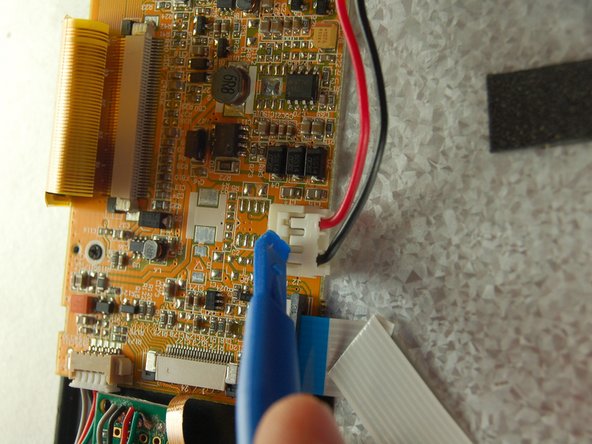
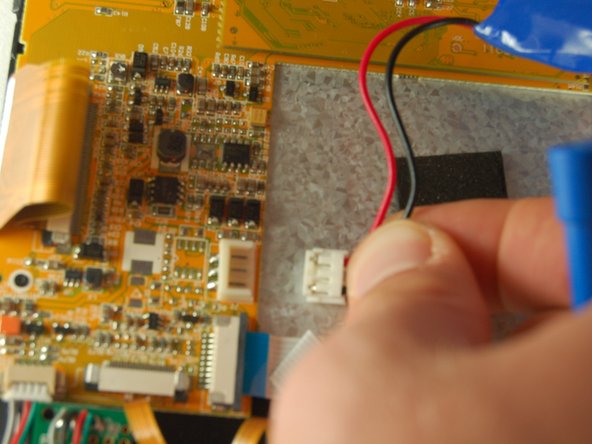
Unplug the battery at the plug indicated by the plastic opening tool. (The best way to do this is to place a finger on both sides of the plug and pull out gently) Once you have removed the old battery, plug the new battery into the same plug the old one came from.
-
-


To reassemble your device, follow these instructions in reverse order.

Team

Texas Tech, Team 38-1, Bennett Fall 2016 Member of Texas Tech, Team 38-1, Bennett Fall 2016
TTU-BENNETT-F16S38G1
3 Members
24 Guides authored
