
Logitech UE Hyperboom Bottom Panel Replacement

Ethan Abbott and 2 other contributors
Last updated on May 21, 2026
Views: 228
View statistics:
- Past 24 Hours:
- 2
- Past 7 Days:
- 15
- Past 30 Days:
- 66
- All Time:
- 228
Comments: 0
No one has left comments on this guide. Will you be first?
Go to guide commentsCompleted: 1 2
1 person has marked this guide "completed." Will you be next?
2 people have marked this guide "completed." Including you — great job!
Favorites: 0 1
No one has favorited (and subscribed to) this guide. Will you be the first?
1 person has favorited (and subscribed to) this guide — and that's you!
Introduction
Go to step 1 ↓Use this prerequisite guide as an initial step before accessing the internal components of the speaker.
What you need
Tools
-
PliersOptional
-


-
-
-
Unscrew the two black flat-top screws that attach the handle to the speaker with your hands.
 Ask FixBot
-
-
-
-
-
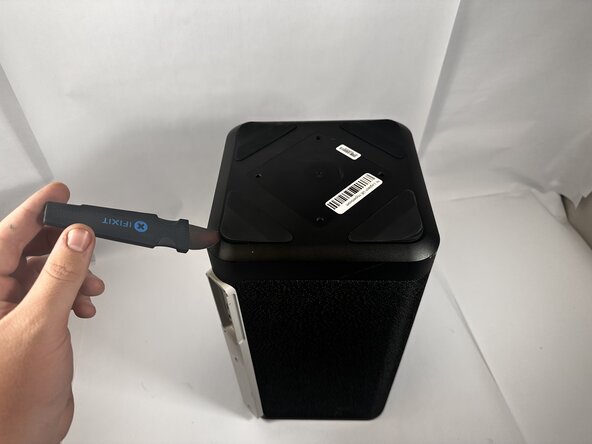
Use the Jimmy to pry off the four rubber feet on the bottom of the speaker.
-
-
-
-
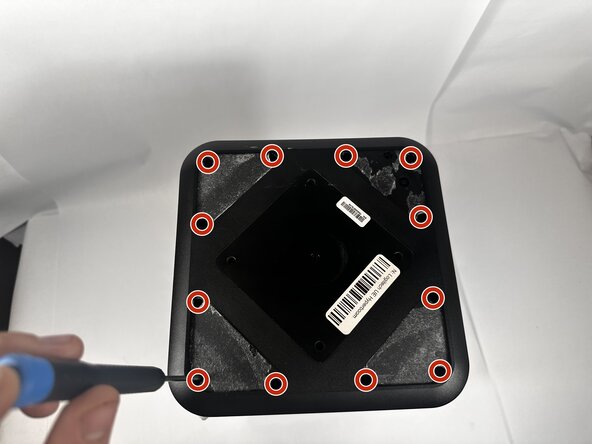
Use a Phillips #0 screwdriver to remove all twelve 11.7mm screws from the bottom panel of the speaker.
-
Pull the panel off to access the internal components.
-
-






To reassemble your device, follow these instructions in reverse order.
Cancel: I did not complete this guide.
One other person completed this guide.

Team

Idaho State University, Team 1-2, Watkins Spring 2026 Member of Idaho State University, Team 1-2, Watkins Spring 2026
ISU-WATKINS-S26S1G2
3 Members
96 Guides authored
