Introduction
My M705's scroll wheel suddenly stopped working. It would spin, but the computer would not recognize the scroll input. Cleaning the scroll wheel housing and sensors fixed the issue!
What you need
-
-
-
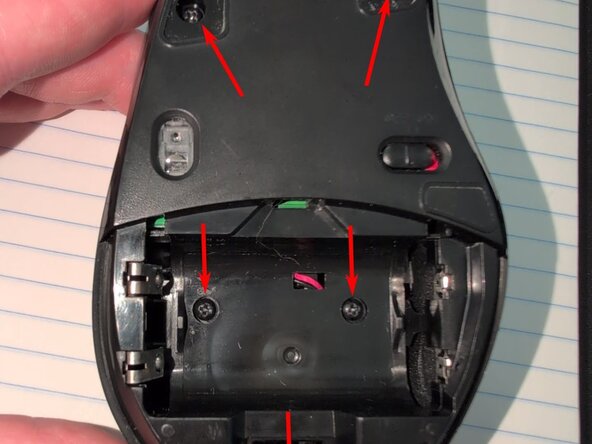
Remove the 5 screws from the bottom of the mouse
-
The bottom piece should detach from the top piece pretty easily
 Ask FixBot
-
-
-
Unplug the 3-wire connector that runs between the top piece and the circuit board
-
-
-
There's a plastic piece which can freely flop around on top of the scrollwheel. BEFORE REMOVING IT, ensure that the scrollwheel is in "free spinning" mode, not "you can feel the scroll detents" mode.
-
If you're not in "free spinning" mode, press it into the white button on the scrollwheel housing to switch from "detent mode" to "free spinning" mode.
-
Gently pry the clear plastic outward to release the pin from the black plastic piece. Repeat on the other side to remove the black plastic lever.
-
-
-
-
On the rearward side of the clear plastic scrollwheel assembly, there's a black plastic pin which holds the movable part (clear plastic) to the circuit board (black plastic).
-
Remove this pin by sliding it to the left
-
I used a screwdriver to push it from the right to get it started
-
Once the pin is removed, lift the scrollwheel straight up and it should easily separate from the circuit board.
-
NOTE: when you re-assemble the mouse, take care to lower the scrollwheel assembly straight down onto the board and not at an angle!
-
In particular, take extra care to ensure that the springs at the front of the mouse are still facing upward, and didn't get squished out sideways.
-
-
-
The "spring guard" goes around the spring and pin which are responsible for providing the haptic feedback when you scroll the wheel in "feel the detents" mode.
-
Remove the screw from the bottom of the scrollwheel assembly
-
On the left side of the scrollwheel, there's a very small pin protruding from the clear plastic which holds the black spring guard piece. Gently pry the black piece outward past this pin to remove the spring guard.
-
-
-
This little metal lever is what provides the haptic feedback when it engages with the scroll wheel. We need to move it out of the way so that the wheel itself can be removed
-
Gently pull the metal lever outward.
-
I do not recommend fully removing the lever. Only pull it out far enough that it is clear of the wheel.
-
-
-
The scroll wheel is held in place by one pin protruding from the wheel on each side, resting in a hole in each side of the clear plastic housing.
-
Gently pry the clear plastic piece apart by gripping with your fingers on the piece indicated by the arrow in the picture. Hold the assembly upside down so that the wheel will simply fall out.
-
It takes a decent amount of force to pull the plastic piece apart! Go slowly and gradually increase pressure so that you don't accidentally snap the clear plastic piece!
-
-
-
Now that the wheel is removed, thoroughly clean the inside of the housing, where dirt and grime can accumulate
-
I used a cotton Q-tip which was the perfect size for reaching into the bottom
-
Ensure that you clean the side walls too! The clear sides of the housing are where the infrared light passes through for the sensor to detect the scrollwheel's movement!
-
Since you've got it open, make sure to clear off everything in the optical path of the sensor:
-
The IR emitter and sensor on the circuit board
-
The inside and outside of the clear scrollwheel housing
-
The inner part of the scrollwheel itself, where you see the small slits.
-
-
-
Everything will go back together easily by following the steps in reverse order!
-
-


To reassemble your device, follow these instructions in reverse order.
Cancel: I did not complete this guide.
One other person completed this guide.

1 Guide Comment
Thank you so much for this excellent guide!
The first problem I had was that the connector would not come loose from the logic board. There is a way to do it of course. There are two little holes at the front of the socket. Poke there with something like a metal pin and then you can pull out the connector more easily.
As mentioned in the guide: take care not to bend the two tiny springs that sit beneath the scroll wheel assembly. And don't lose them! These are vital. I dropped one on the floor and discovered it about 15 minutes later. It took me at least another 20 minutes to find the spring again.
"The plastic piece which can freely flop around on top of the scroll wheel" comes off easily enough. But make a note of how it was positioned! I managed to put it on the other way when I reassembled the mouse.
Don't lose the little plastic pin that secures the scroll wheel assembly and remember how it was positioned originally.
The hardest part I think was to remove the scroll wheel from the clear plastic housing. You will have to be extra careful. In my case the scroll wheel did not fall out and I had to try again and again. Take care not to damage the little plastic slits within the wheel.
Hooray it worked!
