
Logitech Harmony Companion Remote Battery Replacement

Cassidy Wardlow and 2 other contributors
Last updated on Apr 8, 2024
Views: 28K
View statistics:
- Past 24 Hours:
- 7
- Past 7 Days:
- 36
- Past 30 Days:
- 191
- All Time:
- 27,600
Comments: 4
1 comment on steps, 3 guide comments.
Go to guide commentsCompleted: 3 4
3 people have marked this guide "completed." Will you be next?
4 people have marked this guide "completed." Including you — great job!
Favorites: 0 1
No one has favorited (and subscribed to) this guide. Will you be the first?
1 person has favorited (and subscribed to) this guide — and that's you!
Introduction
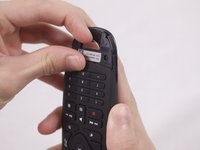
Go to step 1 ↓If you are still having problems with your Companion remote after changing the command settings, it may be time to change the remote battery. This guide will help you access and replace your Companion remote battery. There are no tools required for this guide, all you need to do is remove the battery cover and lift the battery.
What you need
Parts

-
-
-
-
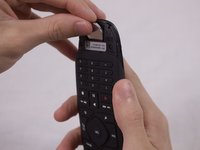
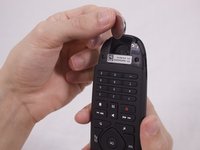
Use your finger to lift the battery out of the compartment.
-
When the battery has lifted, push it up to remove it.
-

 Ask FixBot


To reassemble your device, follow these instructions in reverse order.
Cancel: I did not complete this guide.
3 other people completed this guide.

Team

USF Tampa, Team S1-G3, Nance Fall 2017 Member of USF Tampa, Team S1-G3, Nance Fall 2017
USFT-NANCE-F17S1G3
3 Members
48 Guides authored
3 Guide Comments
Article fails without mentioning the type of battery the remote uses.
The battery type is CR2032 3v Lithium coin/button cell
Very helpful.
