
Logitech G603 Wheel Encoder Replacement

Last updated on Nov 24, 2025
Views: 6.9K
View statistics:
- Past 24 Hours:
- 11
- Past 7 Days:
- 64
- Past 30 Days:
- 304
- All Time:
- 6,940
Comments: 2
1 comment on steps, 1 guide comment.
Go to guide commentsCompleted: 1 2
1 person has marked this guide "completed." Will you be next?
2 people have marked this guide "completed." Including you — great job!
Favorites: 1 2
1 person has favorited (and subscribed to) this guide. Will you be next?
2 people have favorited (and subscribed to) this guide — including you!
Community-Contributed Guide
An awesome member of our community made this guide. It was not created by iFixit staff.
Introduction
Go to step 1 ↓Logitech G603 mouse wheel encoder replacement.
The encoder is a Logitech 210-001795. It's possible the PCB color on replacements is different than what's inside the G603.
What you need


-
-
-
Remove magnetic top cover, batteries, and wireless receiver (if currently stored inside the mouse)
 Ask FixBot
-
-
-
Carefully remove the feet to reveal the 4 screws holding the top and bottom shells together
-
NOTE: These feet can be removed carefully enough to be reused. Only the top and bottom feet need to be removed, not the one around the sensor
-
-
-
Use Phillips #00 to remove the four bottom screws
-
-
-
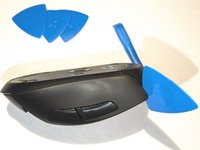
Start at the top above the left and right click and slowly work your way around the shells until they are separated
-
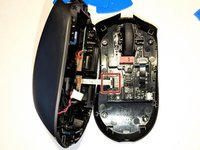
Be careful not to damage the power connector or ribbon cable going from the top shell's boards/battery to the bottom shell's board
-
-
-
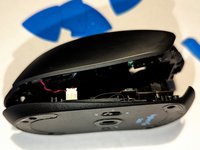
Start with the red and black power cable and gently pull it out
-
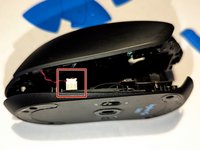
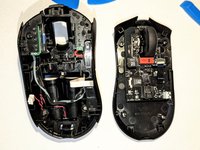
Once power cable is removed, you should be able to unfold the two halves and unplug the white ribbon cable
-
-
-
Gently pull out the black ribbon cable connecting the encoder board to the main board
-
-
-
-
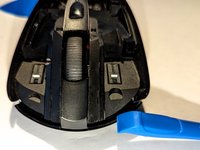
Remove the Phillips #00 screws holding the encoder board in place
-
-
-
Remove the encoder board from the bottom shell
-
Gently remove the wheel from the older encoder board
-
NOTE: The old wheel can be reused in the replacement encoder board
-
-






To reassemble your device, follow these instructions in reverse order.
Cancel: I did not complete this guide.
One other person completed this guide.

1 Guide Comment
In my case, cleaning the encoder plate in an ultrasonic bath did the trick.
