
CASIO mw240-1bv Battery Replacement

Jasmyn McBeth and 5 other contributors
Last updated on Oct 14, 2026
Views: 13K
View statistics:
- Past 24 Hours:
- 16
- Past 7 Days:
- 98
- Past 30 Days:
- 376
- All Time:
- 13,210
Comments: 2
2 guide comments.
Go to guide commentsCompleted: 7 8
7 people have marked this guide "completed." Will you be next?
8 people have marked this guide "completed." Including you — great job!
Favorites: 0 1
No one has favorited (and subscribed to) this guide. Will you be the first?
1 person has favorited (and subscribed to) this guide — and that's you!
Introduction
Go to step 1 ↓If your watch is running behind or the time displayed on the watch is not changing at all, it may be time to replace your battery. This guide will walk you through how to replace the battery in your CASIO mw240-1bv watch without accidently breaking something within your watch. The only tools you will need for this repair is a Phillips screwdriver, a pair of tweezers, and you may find a magnetic pad useful to keep track of the small screws.
What you need
Parts
Tools


-
-
-
Use a Phillips #00 screwdriver to remove the four screws from the back of the watch.
-
Remove the back cover of the watch.
 Ask FixBot
-
-
Tool used on this step:Tweezers$4.99
-
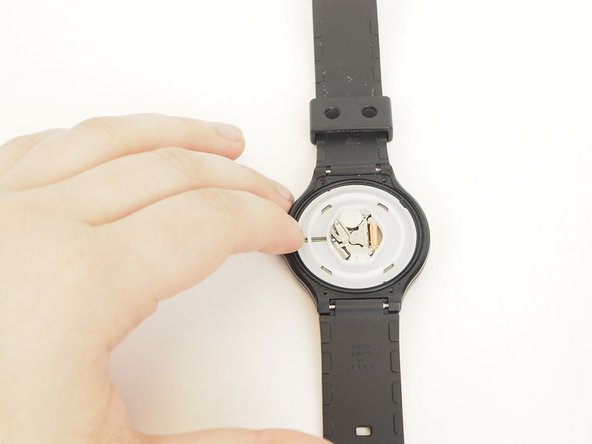
Use the tweezers to pull the small metal piece to the right slightly to allow the battery to pop out.
-
Replace battery with a SR626SW watch battery.
-
-
-
-
If the rubber seal pops out, realign the rubber seal with the groove along the back face.
-
-



To reassemble your device, follow these instructions in reverse order.
Cancel: I did not complete this guide.
7 other people completed this guide.

Team

Embry-Riddle Aeronautical University, Team 9-14, Rauch Fall 2021 Member of Embry-Riddle Aeronautical University, Team 9-14, Rauch Fall 2021
ERAU-RAUCH-F21S9G14
2 Members
12 Guides authored
