Free Shipping on Domestic Orders $75+

Lenovo Yoga Tablet 2 830-F Motherboard Replacement

What you need

    1. Lenovo Yoga Tablet 2 830-F Motherboard Replacement, Motherboard: step 1, image 1 of 2 Lenovo Yoga Tablet 2 830-F Motherboard Replacement, Motherboard: step 1, image 2 of 2
      • Remove the two 3mm screws on the back of the device with the Phillips Screwdriver #00 bit.

      • Remove the 2mm screw on the back fo the device with a Phillips #00 bit.

      • Using the blue opening tools or spudger, gently remove the back cover to expose the interior of the tablet.

      Ask FixBot

      Add Comment

    2. Lenovo Yoga Tablet 2 830-F Motherboard Replacement: step 2, image 1 of 2 Lenovo Yoga Tablet 2 830-F Motherboard Replacement: step 2, image 2 of 2
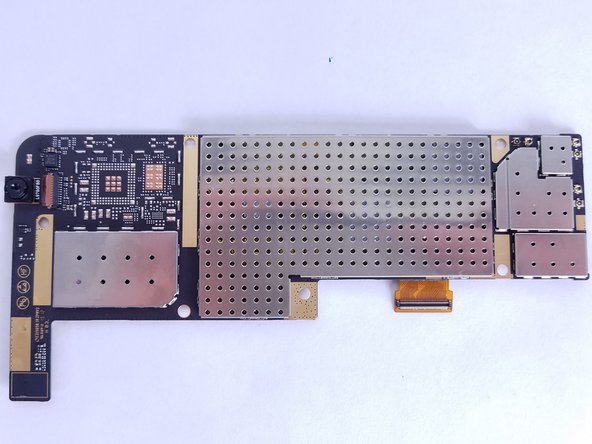
      • Remove the six 3mm screws on the back of the motherboard with the Phillips Screwdriver #00 bit.

      • Remove the ribbon cables connecting the boards to the other electrical components

      • Remove ZIF connectors connecting the boards to the electrical components.

      • Some of the ribbon cables are secured with clips, simply pry up the clips before sliding them out of the pin connectors.

      Ask FixBot

      Add Comment

    3. Lenovo Yoga Tablet 2 830-F Motherboard Replacement: step 3, image 1 of 2 Lenovo Yoga Tablet 2 830-F Motherboard Replacement: step 3, image 2 of 2
      • Replace the motherboard with the new motherboard.

      • Be careful not to damage the ribbon cables when reassembling the device.

      Ask FixBot

      Add Comment

Conclusion

To reassemble your device, follow these instructions in reverse order.

Cancel: I did not complete this guide.

Charles Rhode

Member since: 09/28/17

630 Reputation

3 Guides authored

Team

USF Tampa, Team S2-G4, Nance Fall 2017 Member of USF Tampa, Team S2-G4, Nance Fall 2017

USFT-NANCE-F17S2G4

3 Members

72 Guides authored

0 Guide Comments

Add Comment

View Statistics:

Past 24 Hours: 2

Past 7 Days: 29

Past 30 Days: 120

All Time: 2,617