Free Shipping on Domestic Orders $75+

Lecia DME Light Source Bulb Replacement

What you need

    1. Lecia DME Light Source Bulb  Replacement, Light Source Bulb: step 1, image 1 of 3 Lecia DME Light Source Bulb  Replacement, Light Source Bulb: step 1, image 2 of 3 Lecia DME Light Source Bulb  Replacement, Light Source Bulb: step 1, image 3 of 3
      • Set the Microscope up vertically.

      • Unplug the power cord from the microscope.

      • Do not pull from the wire. Hold it by the plug and pull away from the microscope.

      Ask FixBot

      Add Comment

    2. Lecia DME Light Source Bulb  Replacement: step 2, image 1 of 2 Lecia DME Light Source Bulb  Replacement: step 2, image 2 of 2
      • Carefully lay the microscope on its back to expose the bottom.

      • Hold it by the base and the frame in order to not to damage the microscope.

      Ask FixBot

      Add Comment

    3. Lecia DME Light Source Bulb  Replacement: step 3, image 1 of 3 Lecia DME Light Source Bulb  Replacement: step 3, image 2 of 3 Lecia DME Light Source Bulb  Replacement: step 3, image 3 of 3
      • Pull the release knob away from the base to open the light hatch.

      Ask FixBot

      Add Comment

    4. Lecia DME Light Source Bulb  Replacement: step 4, image 1 of 3 Lecia DME Light Source Bulb  Replacement: step 4, image 2 of 3 Lecia DME Light Source Bulb  Replacement: step 4, image 3 of 3
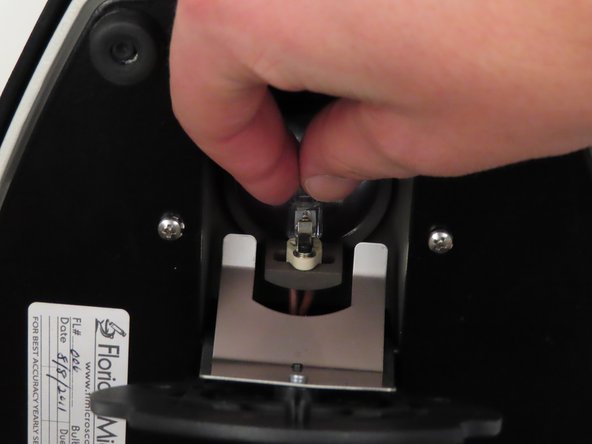
      • Carefully grab both sides of the light bulb.

      • Gently wiggle the light bulb side to side in order to remove it from the socket.

      Ask FixBot

      Add Comment

    5. Lecia DME Light Source Bulb  Replacement: step 5, image 1 of 3 Lecia DME Light Source Bulb  Replacement: step 5, image 2 of 3 Lecia DME Light Source Bulb  Replacement: step 5, image 3 of 3
      • Grab a new 20W 12V halogen bulb to replace the broken one.

      • The place for the bulb information is located on the base of the microscope.

      Ask FixBot

      Add Comment

    6. Lecia DME Light Source Bulb  Replacement: step 6, image 1 of 3 Lecia DME Light Source Bulb  Replacement: step 6, image 2 of 3 Lecia DME Light Source Bulb  Replacement: step 6, image 3 of 3
      • Take the new light bulb and firmly grasp the sides of it.

      • Insert the new bulb into the now empty socket.

      • Carefully wiggle it into place. Make sure its all the way in the socket to ensure a good connection.

      Ask FixBot

      Add Comment

    7. Lecia DME Light Source Bulb  Replacement: step 7, image 1 of 2 Lecia DME Light Source Bulb  Replacement: step 7, image 2 of 2
      • Close the hatch that covers the light bulb.

      • Push against the base until you hear the click of the pull and release knob setting back into place.

      Ask FixBot

      Add Comment

    8. Lecia DME Light Source Bulb  Replacement: step 8, image 1 of 3 Lecia DME Light Source Bulb  Replacement: step 8, image 2 of 3 Lecia DME Light Source Bulb  Replacement: step 8, image 3 of 3
      • Hold the microscope by the base and frame and carefully place it upright.

      • Take the power cord and plug it back into the microscope.

      Ask FixBot

      Add Comment

    9. Lecia DME Light Source Bulb  Replacement: step 9, image 1 of 1
      • Turn the red dial on the base of the microscope to test the new light.

      Ask FixBot

      Add Comment

Conclusion

After replacing the old light your Leica Microscope should be up and working again.

Cancel: I did not complete this guide.

0 Guide Comments

Add Comment

View Statistics:

Past 24 Hours: 3

Past 7 Days: 20

Past 30 Days: 94

All Time: 1,595