Introduction
The purpose of this guide is to replace the LeapPad's battery. The battery is essential to receiving any form of functionality from the device. Without a working battery the device is powerless. Once the replacement is finished, be sure to properly dispose of the old battery at appropriate locations such as a batter recycling center.
What you need
-
-
-
Remove the barcode covering the two screws on the lower back of the Leap Pad.
 Ask FixBot
-
-
-
-
Using a plastic opening tool, pry off the outer protective child proof casing, starting from the bottom.
-
-
-
Remove the 7 mm screw to the right of the cartridge dock, two 8 mm screws in the top left, and the nine 8 mm screws holding the the green shell.
-
-
Tool used on this step:Tweezers$4.99
-
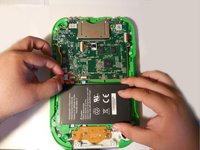
Disconnect the battery using tweezers or your fingernails.
-
The battery is glued down, if available put some isopropyl alcohol around the edges of the battery to soften the glue.
-
Gently pry of the battery lose using a spudger or another thin prying tool.
-
-


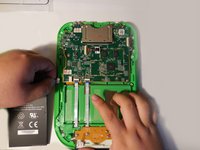
To reassemble the device, follow these instructions in reverse order.
Cancel: I did not complete this guide.
7 other people completed this guide.

Team

USF Tampa, Team 4-99, Meier Fall 2015 Member of USF Tampa, Team 4-99, Meier Fall 2015
USFT-MEIER-F15S4G99
4 Members
45 Guides authored
4 Guide Comments
I’m not Ryan, but I just did this process and the apps and files are all still there.
Hello, if anyone still has this leappad Ultra and wanted to purchase a new battery. I have found a retail store https://batteryclerk.com/ The price is reasonable, and I'm just waiting for the batteries to arrive.
