15% Off Selected iFixit Tools — Limited Time
Free Shipping on Domestic Orders $75+

LG Ultimate 2 Digitizer Replacement

What you need

  1. LG Ultimate 2 Digitizer Replacement, Battery: step 1, image 1 of 1
    • Wedge the plastic opening tool into the seam between the plastic backing and the rest of the phone.

    Ask FixBot

    Add Comment

  2. LG Ultimate 2 Digitizer Replacement: step 2, image 1 of 1
    • Use your hand to pull the plastic cover completely off of the phone.

    Ask FixBot

    Add Comment

  3. LG Ultimate 2 Digitizer Replacement: step 3, image 1 of 1
    • Insert the plastic opening tool into the wedge near the bottom of the battery.

    • Lift the battery out.

    Ask FixBot

    Add Comment

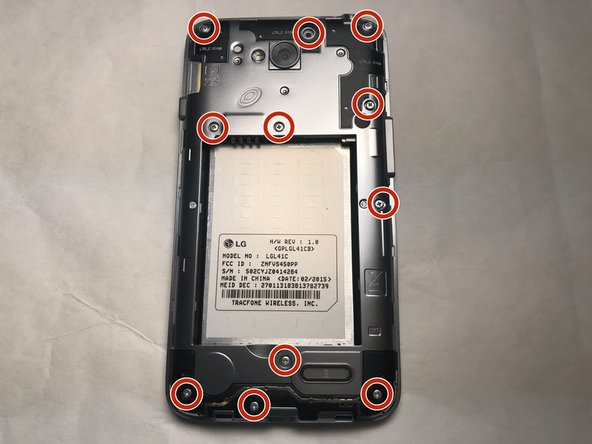
  4. LG Ultimate 2 Digitizer Replacement, Digitizer: step 4, image 1 of 2 LG Ultimate 2 Digitizer Replacement, Digitizer: step 4, image 2 of 2
    • Use a Phillips #0 screwdriver to remove the 11 mid-frame screws.

    Ask FixBot

    Add Comment

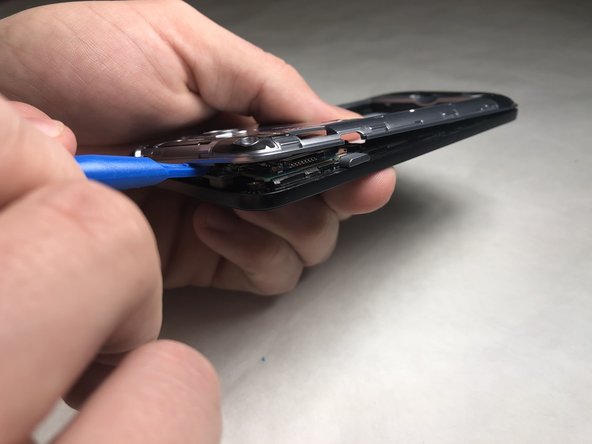
  5. LG Ultimate 2 Digitizer Replacement: step 5, image 1 of 2 LG Ultimate 2 Digitizer Replacement: step 5, image 2 of 2
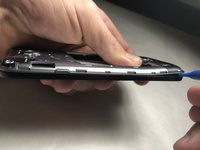
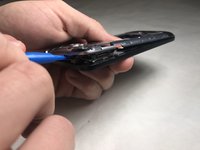
    • Insert the plastic opening tool to start wedging the phone apart.

    • Trace the plastic opening tool along the edge for the entire perimeter of the phone, pulling it apart as you go.

    Ask FixBot

    Add Comment

  6. LG Ultimate 2 Digitizer Replacement: step 6, image 1 of 1
    • Use a plastic opening tool or fingernail to separate the zip connector.

    • The zip connector does not detach completely from the phone, but acts as a flap.

    Ask FixBot

    Add Comment

  7. LG Ultimate 2 Digitizer Replacement: step 7, image 1 of 1
    • Insert the plastic opening tool between the screen and the base. This may be difficult because of the adhesive, but enough leverage should force an opening.

    Ask FixBot

    Add Comment

  8. LG Ultimate 2 Digitizer Replacement: step 8, image 1 of 1
    • Continue moving the plastic opening tool along the edge of the screen, separating the pieces from the adhesive.

    • A hair dryer might be useful to help melt the adhesive.

    Ask FixBot

    Add Comment

  9. LG Ultimate 2 Digitizer Replacement: step 9, image 1 of 1
    • Pry the screen off after all pieces have been loosened from the adhesive.

    Ask FixBot

    Add Comment

Conclusion

To reassemble your device, follow these instructions in reverse order.

Cancel: I did not complete this guide.

Devin Isenhower

Member since: 03/21/18

329 Reputation

2 Guides authored

Team

IUPUI, Team S5-G2, Baechle Spring 2018 Member of IUPUI, Team S5-G2, Baechle Spring 2018

IUPUI-BAECHLE-S18S5G2

3 Members

6 Guides authored

0 Guide Comments

Add Comment

View Statistics:

Past 24 Hours: 2

Past 7 Days: 10

Past 30 Days: 45

All Time: 687