Up to 20% off select tools
Free Shipping on Domestic Orders $75+

LG Tribute Touchscreen Replacement

Views: 17K

View statistics:

Past 24 Hours:
3
Past 7 Days:
20
Past 30 Days:
100
All Time:
16,911
Comments: 4

4 guide comments.

Go to guide comments
Completed: 12

12 people have marked this guide "completed." Will you be next?

Favorites: 9

9 people have favorited (and subscribed to) this guide. Will you be next?

Time Required: 30 - 35 minutes
Difficulty: Moderate
LG Tribute Touchscreen Replacement

What you need

Tools

Introduction

Go to step 1 ↓

This guide will assist in successfully replacing the LG Tribute touchscreen.

    1. LG Tribute Touchscreen Replacement, Battery: step 1, image 1 of 2 LG Tribute Touchscreen Replacement, Battery: step 1, image 2 of 2
      • Use the plastic opening tool to pry off the back cover.

      Ask FixBot

      Add Comment

    2. LG Tribute Touchscreen Replacement: step 2, image 1 of 1
      • Lift the battery out of place.

      • When replacing the battery, the (+) and (-) symbols must match up with the phone's charging nodes.

      Ask FixBot

      Add Comment

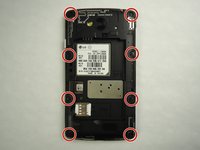
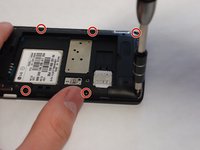
    1. LG Tribute Touchscreen Replacement, Mid-panel: step 3, image 1 of 2 LG Tribute Touchscreen Replacement, Mid-panel: step 3, image 2 of 2
      • Remove eight 4mm screws using a Phillips head 000 screwdriver (PH000).

      Ask FixBot

      Add Comment

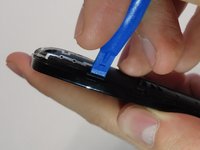
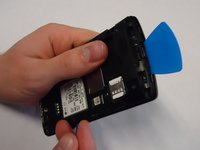
    2. LG Tribute Touchscreen Replacement: step 4, image 1 of 2 LG Tribute Touchscreen Replacement: step 4, image 2 of 2
      • Use a plastic opening tool to loosen the tabs around the edge of the phone.

      • Inserting a thin piece of plastic will help prevent opened tabs from locking back into place.

      • This step can be frustrating, but requires patience. Avoid the temptation to pry the panel loose. Using excessive force may break the delicate tabs.

      Ask FixBot

      Add Comment

    1. LG Tribute Touchscreen Replacement, Motherboard: step 5, image 1 of 1
      • Use a plastic opening tool to disconnect the touchscreen from the motherboard.

      • The motherboard will be completely free from the front panel after this step.

      Ask FixBot

      Add Comment

    1. LG Tribute Touchscreen Replacement, Touchscreen: step 6, image 1 of 3 LG Tribute Touchscreen Replacement, Touchscreen: step 6, image 2 of 3 LG Tribute Touchscreen Replacement, Touchscreen: step 6, image 3 of 3
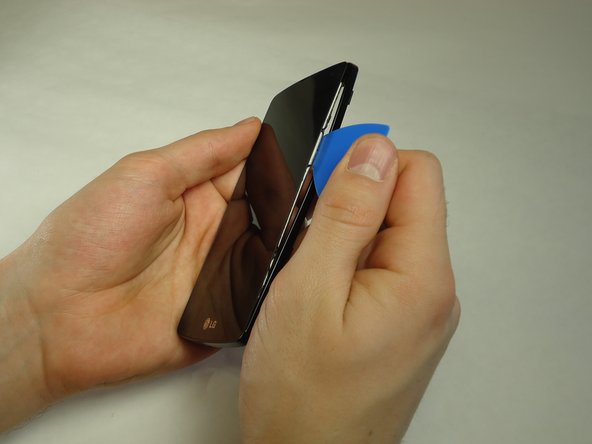
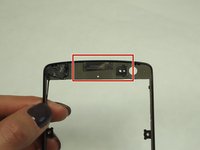
      • Use a thin piece of plastic to carefully peel the frame away from the touchscreen glass.

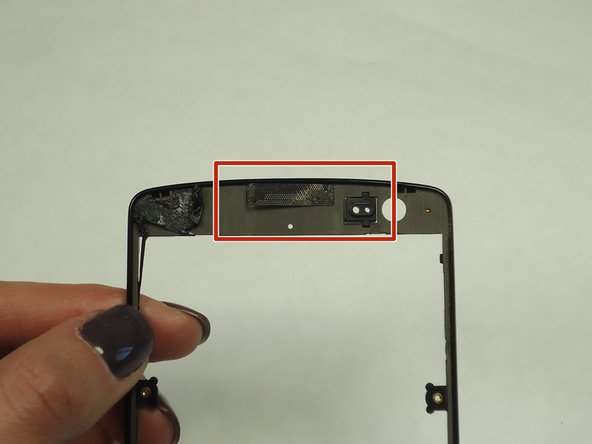
      • When the frame is completely free, remove all of the glue.

      • When removing the glue, be sure the speaker grill and LED light spacer do not dislodge.

      Ask FixBot

      Add Comment

Conclusion

To reassemble your device, follow these instructions in reverse order.

Cancel: I did not complete this guide.

12 other people completed this guide.

Author

with

Aaron Amdall

Member since: 01/25/16

940 Reputation

4 Guides authored

4 Guide Comments

thank you for all ypu work at web site

salah dholman - Reply Share

Can you peel away lens without taking apart ?

mikeknapik1 - Reply Share

Must I remove the motherboard to replace the front cover with the glass?

Deb Schell - Reply Share

I messed up the speaker is there a way to replace or fix it

bigestbabybratt - Reply Share

Add Comment

View Statistics:

Past 24 Hours: 3

Past 7 Days: 20

Past 30 Days: 100

All Time: 16,911